

2023 is almost over. Almost. And if you haven't already left for your Christmas vacation? I can only hope you are starting to wrap it all up for the break. I know I am. The ebbing off at work is a great opportunity to catch up or pack in some fun stuff, and for me one of those things is getting personally reacquainted with Microsoft Teams which is changing rapidly having shipped some great new adds into 2.1. Last time, we looked at personal invites to everyone in a channel meeting which was a big gap that was finally filled. This time, we'll look at a new channel creation experience, as well another new experience giving admins the ability to create frontline teams using Microsoft Entra attributes right through the TAC. Why are these things so valuable? In terms of the new channel creation experience its an easy-to-hand, highly visible way of creating a channel and yet it's also a strategy for curbing the creation of Teams. If people don't have to scroll 20 teams down to create a channel in a specific team then they are - probably - more likely to do so. In terms of the frontline teams experience this is a wizard blending Dynamic Membership in Microsoft Entra ID and Teams Templates. Perhaps its an elephant in the room - but creating teams, adding every user and every app manually can take time. Maybe it's too much time when you have hundreds to teams to manage where many of those teams need to be simple, standardised and purposeful to audiences who typically need a focused team and set of apps. So let's see how we go.
Category: Microsoft Entra
[Archived] Teams Real Simple with Pictures: Deploying Microsoft Entra Internet Access in Preparation for Teams
![[Archived] Teams Real Simple with Pictures: Deploying Microsoft Entra Internet Access in Preparation for Teams](https://microsoft365pro.co.uk/wp-content/uploads/2023/09/image-15.png?w=863&h=0&crop=1)
Ok - 17 days to the holiday and counting! But before I get to a beach on the Atlantic one of the things I really wanted to do is ensure I get the opportunity to get a blog down on Microsoft Entra Internet Access. I think it's going to be an important solution moving forward. So this begs the question - what exactly is it? And why do I think it's important? Microsoft Entra Internet Access (MEIA) is part of Microsoft Entra Global Secure Access service defined as 'securing access to Microsoft 365, SaaS, and public internet apps while protecting users, devices, and data against internet threats...". Announced alongside Private Access at the Microsoft Entra moment prior to Inspire back in July, it's an '..identity-centric, device-aware, cloud-delivered Secure Web Gateway (SWG)' which is part of Microsoft's SASE/SSE strategy alongside Defender for Cloud Apps. Chances are you've already seen something like this from the likes of Z-Scaler and Palo Alto. But this is Microsoft's proprietary gateway built right into Microsoft Entra. That's awesome. But aside from being a net new proprietary feature what's its value? The importance of the SWG is, amongst other things, its ability to prevent attacks such as token replay attacks and attacker in the middle (AITM) attacks by ensuring conditional access to Microsoft 365 services through compliant networks and endpoints. Therefore, as attacks are becoming more sophisticated and we are seeing things such as token theft to breach tenants, or bypassing MFA, new defences such as a SWG are as timely as they are necessary. For me? This could become as fundamental as MFA and Conditional Access. Now at the time of writing this solution is actively being developed and Teams itself isn't supported. But we know it will be. And it will be soon. The point is this shouldn't be a blocker to implementation - it'll still cover Exchange, SharePoint, OneDrive and other things such as the Graph so let's not wait - let's get it in for Teams. So this blog is an exploratory one. It's the tip of the iceberg and you'll want to investigate your own scenarios, read others blogs and bear in mind that whilst for Windows only, it'll cover more in the future. I know this is something that we'll be collectively working on and writing more about in the future.
[Archived] Teams Real Simple with Pictures: Making Teams Just in Time with PIM for Groups
![[Archived] Teams Real Simple with Pictures: Making Teams Just in Time with PIM for Groups](https://microsoft365pro.co.uk/wp-content/uploads/2023/08/image-78.png?w=863&h=0&crop=1)
So I booked a holiday to Gran Canaria last week. The positives: time with the family, late summer sun, changing it up with the scenary and a great package and price. Negatives: it's on 20th September so large parts of my workload are now super time sensitive. It's going to be wild. For real. But here on the bank-holiday weekend in the UK I've got a little time to write: and today I have decided to do it on the idea of making Teams Just in Time (JIT) which, I guess, is a concept very applicable to my own situation. So why would we do this? Well, one of the issues we have in Teams is that we don't need access to all Teams all the time, and also we have access to Teams that sometimes we don't need to have access to all the time. In other words, there could be reasons why we need Just in Time access, and not need whats called standing access. For example, I need to access a Team for a day in order to access specific assets in that team, or apps built within that team. I am sure you can think of your own. Now, we could go down another route and use Entitlement Management, Access Packages and Access Reviews right? Yeah, we could. But let's say I only want to give access for a specific period of time, to do something specific and then the user is removed and has to apply again to be added to it, and that's all auditable at the same time. This is where PIM for groups will come into it's own, especially where Entra ID roles are group specific. A team which shows for a specific period of time to do what's needed and collaborate with others, and disapears again when the time limit is reached. I personally think this one is worth exploring as it could really change the way we think of Teams.
[Archived] Teams Real Simple with Pictures: Implementing System Preferred MFA
![[Archived] Teams Real Simple with Pictures: Implementing System Preferred MFA](https://microsoft365pro.co.uk/wp-content/uploads/2023/07/image-122.png?w=863&h=0&crop=1)
Ok time is of essence! There is a ton on. Corp wise. Community wise. You may have seen it on social this week that Teams Nation is coming back. Yes, Vesku and I were asked many many times. And yes, we decided to get onboard that crazy train again. But whilst it may seem like an eon away given it's February 2024 and a million things will happen between now and then; you'll have to believe me when I say that I'll soon be sitting here the weekend prior doing last minute speaker checks. So this week is a real quick one. And it's really following on from the blogs on Entra that I have covered the past few weeks. This is looking at System Preferred MFA in the context of Teams. So what is it? By definition, 'System-preferred multifactor authentication (SPMFA) prompts users to sign in using the most secure method they registered'. In other words, if you have registered Authenticator and SMS as two methods to sign-in using MFA then SPMFA is going to prioritise the more secure method which is Authenticator over SMS. It doesn't stop the choice of the other, but it does set precedence when signing into an app such as Teams or into the Microsoft 365 portal. Why is this important? Two reasons. The first is as described - it sets the most secure sign in method and that's ultimately what we as admins want to see for our users in Teams. The second is that by setting precedence, this could facilitate user behavioural change over time, with a view to removing less secure registered methods in the future. Now this feature should be set to enabled by default in time, but today in my Ring 4 test tenant it's set to Microsoft Managed. Could be lit up. May not. But it's not enabled. So here's a twist. Lets enable the methods for Authenticator and SMS, then enrol to MFA, then enable System-preferred MFA by default. Just for laughs, but also because I have a nice fresh tenant after my old one went into grace 😀
Teams Real Simple with Pictures: User-to Group Affiliation, or Using Machine Learning to provide Access Review recommendations of Team Members
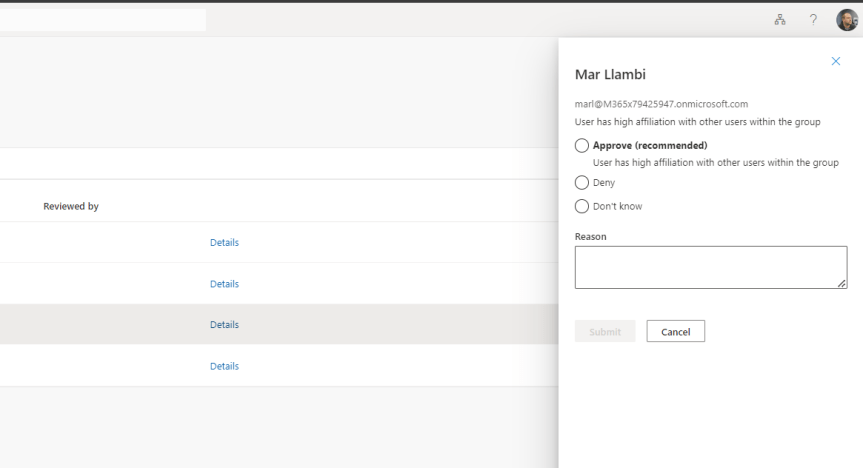
Some of the things I've been doing this past week: wrapping up the roll out to Switzerland. Prepping from a backend perspective for Germany. Completing a migration from Arvato to Pearson VUE. Scrubbing out anything I can find in reference to Azure AD with extreme prejudice. Progressing multiple DevOps items for net adds to portal UI's for better UX. Then there was Inspire (I managed to get to about 30 sessions all in all). Oh, and testing out the new Secure Service Edge functionality in Entra. These are just some of the high level items from my current corp portfolio. And that doesn't take into account MCT. Nor MVP and community activities. So to use analogies it's like an all you can eat buffet out there right now. And pretty much every day feels like this great game of whack-a-mole. But, then again, I admittedly enjoy it - and besides I'm accustomed to the old perpetual firehose. But one increasing challenge - and one which sits sqaurely within this growing dialogue of needing Copilot and AI for specific roles - is staying current. A legit use case is awareness and knowing when all of these diamonds of useful functionality ship across the stack which could make a real difference to ones role. One such functionality is the new User-to-Group Affiliation for Microsoft Entra Access Reviews which I only saw referenced on a social thread this week where a.) I could have easily missed it and b.) could directly help me with my role since I myself am an access reviewer in my own organisation. So what exactly is it? As written 'This Machine Learning based recommendation...' '...detects user affiliation with other users within the group, based on organization's reporting-structure similarity. [It] relies on a scoring mechanism, which is calculated by computing the user’s average distance with the remaining users in the group. Users who are distant from all the other group members based on their organization's chart, are considered to have "low affiliation" within the group' (Microsoft, 2023). In laymans, it's a functionality within the Microsoft Entra ID Governance SKU which helps you reach a decision on whether users should be in that group (hence Team) or have access to an App based on Entra ID properties. Is this important? Well, yes in theory. We ought to operate on Zero trust and principle of least priviledge, and as an access reviewer it could draw attention to those who may not need access, or if we look at it in another sense it could prompt us as admins to action in regards sanitising Entra ID and our org structure. But therein lies the catch. Sidestepping the inevitable conversation of added cost requiring reviewers hold a SKU over and above P2 - for it to work best requires a clean directory. In my experience, this is typically more an exception or luxury as opposed to the rule, and since the solution is based on machine-learning you can't make the assumption it's guaranteed to be right - so there may be some investment in training it in order to sharpen it up.
 @Microsoft365Pro