
![[Archived] Teams Real Simple with Pictures: Launching an Attack Simulation in Teams with Collaborative Security](https://microsoft365pro.co.uk/wp-content/uploads/2023/05/image-71.png?w=863&h=0&crop=1)
It's done. Vuzion is now Infinigate Cloud. And from my own practice perspective the Teams, and the SharePoint Sites have been rebuilt. The lists, and the flows, and the loops, and the Power BI reports. And all has been migrated. There has been legal to do. There has been some architectural to do. There has - truly - been an obscene amount of DevOps tasks. And there has been burndowns the like of which could very much be considered ones for the ages. But it's done. And I never intended to go six weeks off of the blog, but neither did I anticipate having to practically suspend my community and MVP inputs whilst I had to focus and hone in on what needed to be done on the business end. Now, I am very much looking forward to the next few years at Infinigate Cloud. In the immediate future whilst I am holidaying out on the Isle of Wight with the family, I am looking forward to simply writing this blog. It's going to be about launching attack simulations within Microsoft Teams which is part of the new Collaborative Security functionalities announced at Secure and which is currently in preview. This'll need Microsoft Defender for Office 365 Plan 2, of which Attack Simulation Training (AST) is a part, and whilst I'll only run through a straightforward credential harvest, I hope that it will whet the appetite enough for you to go on and test it and explore more. One note right off the bat - in the context of Teams messages are defined strictly as private 1:1 chat messages. No group chat. No channels. No guests. For now.
Category: Microsoft Teams
Teams Real Simple with Pictures: Forcing Public Preview, and transitioning to the New Teams Client

So it's finally here. The new Teams client. Teams Modern. Or what we've referred to here in MVP world as Teams 2.1 over the past several months. On the day it dropped I was over in Paris speaking at MWCP23. No time for blogs. No time to even post one up on social. Of course I saw a few of my friends who did. Good old Vesku. Sara. But between us whilst I kind of expected to see and hear a lot more about it I am also unsurprised given that maybe it's been a little diluted by the waterboarding we've received from Microsoft over the course of the past few weeks. The cacophony of Copilot. The real strong but still SKU based XDR integration via Microsoft Defender for Office 365 as announced at Secure. For me it is 2.1. which tops them all, and which is the most exciting of all and one which I would suggest will trigger a renaissance of sorts. Yes, l look forward to covering and deconstructing all of these things in the months ahead. But today is all about getting to the new Teams Client, and in the process forcing public preview to users from the admin end. Now being in public preview - and being only for the Windows desktop client currently 2.1 will still be more for the few as opposed to the many. And having tested it thoroughly there is still gaps between it and what we now refer to as Teams classic where we may need to move back and forth between the two from time to time, or have the classic version open in a browser. Those gaps will close in time as we head towards GA when the new experience is rolled out further and backed by an SLA. So what are we waiting for?
Teams Real Simple with Pictures: Exporting a List to the Power BI Service as a dataset – and building reports for Power BI in Teams

Back in 2021 I wrote a blog on Lists and Power BI. Microsoft had just released the ability to visualise a list through the integrate tab. And at that time everything was pretty much good, except it had a fundamental issue where whilst it generated the report on top of List, that report didn't appear in the Power BI service itself. I know, I know. It kind of sounds like one of those first world problems right - and I guess to some extents it is given that the report could be created after all. But for me, who uses Lists as data sources, and wanted them in the service, in a workspace alongside other reports and then to pull then back through into the Power BI App in Teams, it was kind of a frustrating situation being that close. Today, I am probably a bigger user of the Desktop App than the service, connecting to Lists and then publishing them to the service. And this scenario probably pushed me to being more of a Desktop user than a Service user all up. But now we have the ability to export the list directly into Power BI as a dataset. This is massive. So let's go building.
Teams Real Simple with Pictures: The new Viva Goals RBAC role, and distinguishing it from the Organisation Admin role
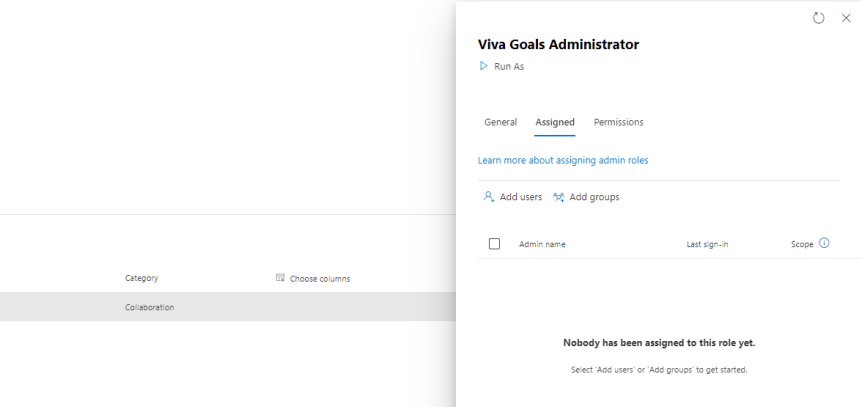
I spoke recently at a Viva Goals AMA with fellow MVP's Karoliina Kettukari and Kevin McDonnell. And in addition to it being a lot of fun I got to tell a little bit about my story and how I got into Viva. This was via Viva Goals. I class myself as what I would call a second wave advocate of Viva. Why? Because the first wave with the initial four apps such as connections and topics seemed to just pass me by. I was too deep into Teams at the time. I was always, for some reason or other getting around to it. Indeed, it was the acquisition of Ally.io and phasing into the portfolio of Goals which which kicked things off for me, because in my mind Goals looked useful from a business perspective. To me, it looked useful in the same way Power BI is useful. It gave purpose, and direction, and evidence of making an impact. So I got hands on in the preview. I liked it. And then I did a bit of testing for Microsoft - particularly around its integration with Teams, I also attended the programs where I fed back a lot of asks on things like integrations, and one of those asks was to have a defined RBAC role for Goals. This is because there wasn't one in the same way there are other RBAC roles for Viva Apps such as Knowledge Manager, whilst at the same time all the admin controls were accessible to the person who set up the org. Whether it is for principle of least privilege, or decentralised administration there is a case for RBAC. But all is not as it seems and there may be some surprises for those into their Azure AD.
Teams Real Simple with Pictures: Adding Pronouns
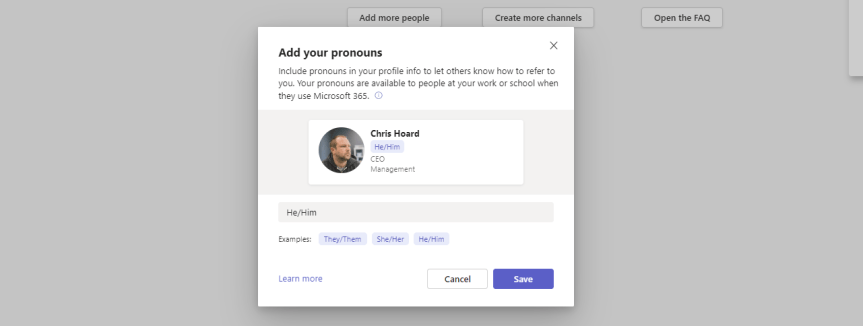
From the definition by Stonewall: "Pronouns are words we use in everyday language to refer to ourselves or others. They can be an important way to express gender identity. For example, ‘I’, ‘me’, ‘she/her’, ‘he/him’ and ‘they/them’ are just some examples of pronouns". In today's modern workplace some may use multiple pronouns. Others may use neopronouns such as xe/xir and ze/zir. Others may avoid the use of pronouns at all. In the context of Microsoft Teams pronouns have been a feature requested for some time. On the feedback portal there are several feedback items; the largest being over 5,000 votes and rising. There is also a petition up on change.org which has nearly reached it's target of 2,500 votes. It has also regularly been mentioned on MVP calls for as long as I can remember. So Microsoft has now added the pronouns feature to Microsoft 365 and it's now come into preview; surfaceable on the contact card used by both Teams and Outlook on the Web. I am sure it will be a priority for many organisations in the near future as it transitions from preview into GA and am sure it will later surface into other surfaces. Why? Because correct use of pronouns is important in terms of helping all staff feel included at work. It can reassure trans and gender non-conforming colleagues that they are welcome and included. And whilst this action, in itself, will only be a small part of building allyship, visibility on the contact card will be a step forward.
 @Microsoft365Pro