
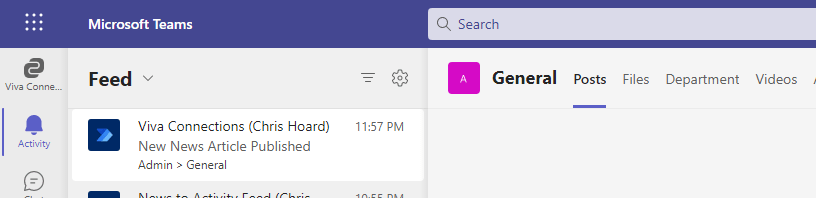
This one is for my good friend Amanda Sterner. I have known Amanda since I started out in the tech community. Like Vesku, and others such as Chirag Patel, Laurent Carlier, Rick Van Rousselt and Karoliina Kettukari she was there at the very beginning and always right behind what Adam and I were doing regarding Oktoberfest (what would become TeamsFest, then Teams Nation). I don't think we ever talked about it - but she was the very first speaker to sign up for that first conference. And when we all went to Ignite later that year at the OCCC I remember Amanda, Vesku, Michael Plettner and I all went out for dinner in a time before the word covid had entered our language. She is part of the team which runs Dagen - Teams Dagen - and what a success that conference is! But when I saw today that Amanda called out on Twitter how could we get a news post into the feed in Teams I couldn't resist.
Category: Microsoft Viva
Teams Real Simple with Pictures: Setting up Viva Connections – From Scratch, End to End
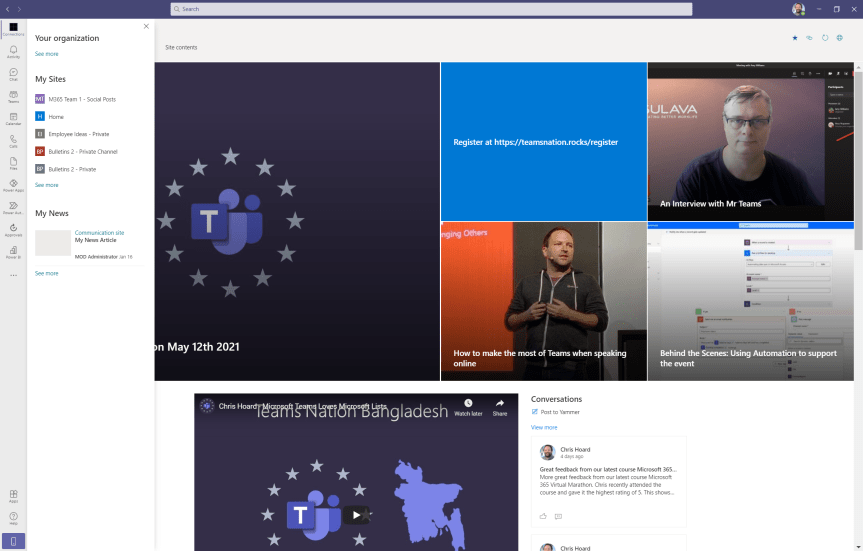
If you haven't already, you'll hear a lot about Viva in the coming months. Viva - from the Latin vivere 'to live' is a set of apps designed to enhance employee experience. In layman's terms, they're made to make your day to day work life better, easier and richer so that you are (in theory) happier, more productive and (in theory) more loyal to the organisation. The idea is that you feel invested in. The organisation thinks about you and how best to support you in your role. Now, there are four apps or 'modules' which constitute Viva with more expected in the future. The first is Viva Topics, an AI powered app which organizes content and expertise into related 'topics' surfaced across existing apps such as Yammer and Microsoft Teams. You want to know what that specific acronym means? Or what that project is all about? Topics will show you a description of that, who is working on it and assets related to it. The idea being that knowledge is to hand without breaking the course of your workflow. You then have Viva Insights, an app which brings together MyAnalytics and Workplace Analytics providing data-driven insights and recommendations to improve productivity and wellbeing. In other words it'll show you things like how much focus time you have and how long you have been working out of hours. It'll show managers how their team members are working together. It's also expected to include Headspace demoed to much fanfare back at Ignite last October. Third, you have Viva Learning, 'a hub for Learning' within Teams aggregating on demand assets from Learn, LinkedIn Learning, third party providers like EDX and a company's own content. This is currently in preview and won't be in GA until later this year. Finally - and what the discussion concerns today, is Viva Connections. Connections is described as being 'the gateway to a modern employee experience' and 'a curated, company-branded experience that brings together relevant news, conversations, and other resources'. It is, more or less, a SharePoint home site surfaced into Teams pinned on the app rail and which will have a mobile experience later in the summer. Unlike the other apps, Connections is completely free and GA making it ideal as the first Viva app for any organisation to get to grips with without having to invest more into licencing - and it is important insofar it fuses SharePoint and Teams even closer together. To many who haven't tried this previously through App Studio, it's exciting stuff.
[Archived] Teams Real Simple with Pictures: Forms to the Flow, to the List, to the Team and Yammer using conditions and approvals
![[Archived] Teams Real Simple with Pictures: Forms to the Flow, to the List, to the Team and Yammer using conditions and approvals](https://microsoft365pro.co.uk/wp-content/uploads/2021/01/image-86.png?w=863&h=0&crop=1)
I had a lot of fun writing the last blog on approvals. So I'd thought I would double down and use the Forms app with Flow and Lists which we can surface into Teams and then push out to Yammer by the way of conditions and approvals. I thought it would just be cool to cover a real world scenario which you could apply, customise to your needs to take parts and use them in your own flow. Rather unusually given the length and amount of apps involved I haven't got much to say - I really hope you really enjoy this one
[Archived] Teams Real Simple with Pictures – Deploying Connectors to deliver Twitter and Yammer content to the Team
![[Archived] Teams Real Simple with Pictures – Deploying Connectors to deliver Twitter and Yammer content to the Team](https://microsoft365pro.co.uk/wp-content/uploads/2019/07/teamscon17.png?w=863&h=0&crop=1)
With Teams, we have a number of things we can do to keep our Team up to date. This includes group chats, conversations in channels, meetings, notifications, mentions, and adding content to the Wiki. Another way is by leveraging what are called connectors to deliver content from apps such as Twitter and Yammer into the conversation tab of the Team channel. Twitter, for example, is used by millions for posting and interacting with messages. Yammer is an enterprise social networking service for broadcasting one to many communications within the business. Both are places users and organisations post news and status updates first. Now, the benefit of setting up connectors to Twitter and Yammer is that members of the Team no longer have to scour them and jump around between all these different Twitter pages and Yammer groups to get the updates they need - we can simply bring them all into a feed! A great time saver.
 @Microsoft365Pro