
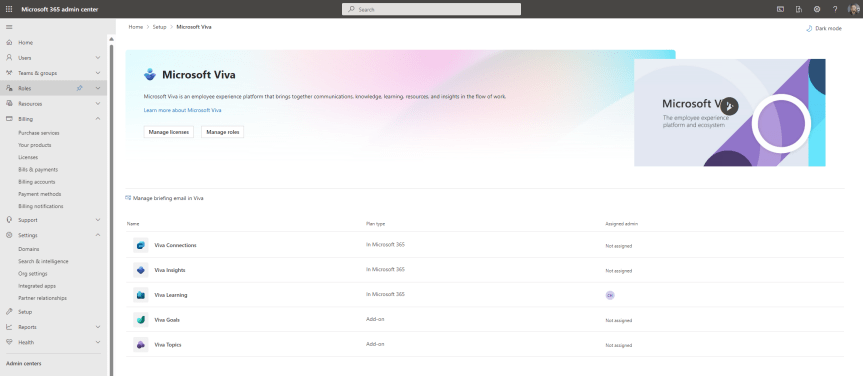
So, Viva? I haven't written a lot about it on this blog, have I? And when it's comes down to it that's probably because I spend a lot of my blogging time keeping up to date with Teams. But since Teams has been a bit quieter lately - at least in terms of the features I use or want to know more about I thought this would be an opportunity for something that caught my eye and something which is currently rolling out. This is the new Viva Admin Experience. Now, I am pretty much what you would call a second wave Viva advocate. I wasn't in with the first lot because I was just so focused on everything else Microsoft 365. And to be honest, the Viva apps which have been my ingress into both the Viva stack and the Viva community have been Goals and Sales, ones which I now use every day. Of course, prior to this I've deployed Connections many times - even when you had to create the Connections app via PowerShell, and setup and configured both Insights and Topics. I've even got a Viva course in the portfolio which has now been taught for over a year. But Goals and Sales gave me the bug, and now I do a ton of community work on Viva (albeit almost all directly with Microsoft). Needless to say, I'm very excited about all of the apps announced back in September - Amplify, Pulse, Answers and Storylines. It's a bright future. And with the rapid expansion it seems prudent to create an admin experience, where we'll likely see a set of granular role-based admin roles for the stack. This is because governance is important - and what we can refer to as horizontal experiences - functionality across the stack - will be important too.
Teams Real Simple with Pictures: Bulk unassign policies in the TAC

Over the years, I have spoken about and covered several blogs on Microsoft Teams policies. As any good Teams administrator will know, policies play a big part in terms of managing users and defining the experience of the front end. Whether it is configuring messaging policies, or app setup policies, or the gamut of calling policies - you won't get very far into the administration without coming up against them and having to understanding and define them. And once we understand them, we begin to understand such things as the difference between org-wide and custom policies, and about policy precedence and the several ways policies can be applied such as direct, batch, package and group. And once we learn all the ways that we can apply them, we then understand that some policies are not even the TAC at all, that we have to use the shell to create new policies and grant those policies to users. So now having returned from annual leave, and Ignite, and South Coast Summit, and plowing through the backlog of all of those things, there is an extremely rich vein of material and functionality to be explored over the coming months. However, I wanted to start with something easy, short, and which I was waiting for before I flew out to Florida. This is bulk unassignment of policies which was announced back in July but didn't surface in the TAC until late September. Now bulk unassignment of policies actually means bulk unassignment of directly assigned custom policies (not org wide) - and what we must remember here is that directly assigned policies take precedence over group policies, which in turn take precedence over org-wide policies. In other words, the ability to bulk unassign custom policies is a utility to clean up and standardize Teams environments, as well as transition out of overly complex configurations with high numbers of bespoke assignments. How can we do achieve this? Does it work with Policy Packages which are also directly assigned and take precedence over group?
Microsoft Ignite 2022: My Schedule, 10 for Teams and Everything Else I’d Recommend

Ignite is here! And hands up I only got back from a two-week vacation in the US yesterday, and it was one where I finally managed to disconnect, get off grid and focus on family, health and pretty much everything but IT - including going through a Cat 4 Hurricane Ian. It was wild. However, the flip side of all this is that I am very much coming into this one hot with a ton of backlog, so this preview will probably be a bit shorter than usual, and it'll all be on the fly
Teams Real Simple with Pictures: Viva Connections – News Posts into the Activity Feed
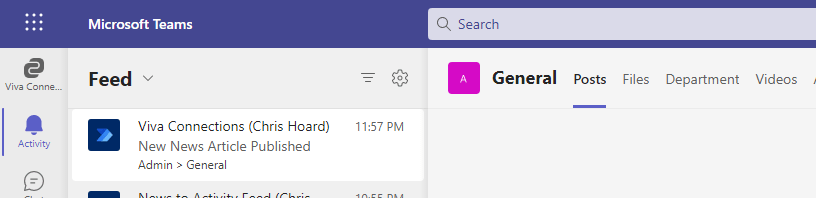
This one is for my good friend Amanda Sterner. I have known Amanda since I started out in the tech community. Like Vesku, and others such as Chirag Patel, Laurent Carlier, Rick Van Rousselt and Karoliina Kettukari she was there at the very beginning and always right behind what Adam and I were doing regarding Oktoberfest (what would become TeamsFest, then Teams Nation). I don't think we ever talked about it - but she was the very first speaker to sign up for that first conference. And when we all went to Ignite later that year at the OCCC I remember Amanda, Vesku, Michael Plettner and I all went out for dinner in a time before the word covid had entered our language. She is part of the team which runs Dagen - Teams Dagen - and what a success that conference is! But when I saw today that Amanda called out on Twitter how could we get a news post into the feed in Teams I couldn't resist.
Teams Real Simple with Pictures: Applying to access a Blocked App. Built in and Custom.
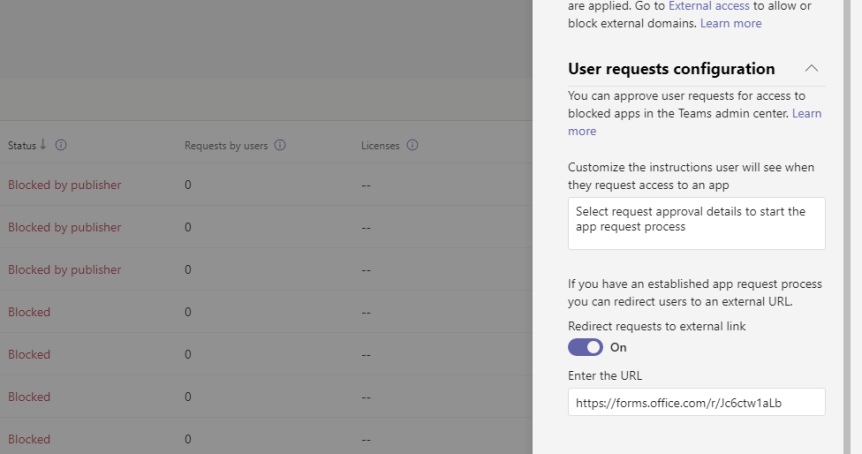
Teams now has over 1,700 apps which are integrated and available to manage via the Teams Admin Centre. This is scary because - to me at least, I can measure the passing of time based upon that number. I can remember saying in one conference that Teams has over 300 apps. In another, Teams has over 500 apps. 700. 1000. You get the picture. And in that time, we've seen functionality introduced such as permissions and app setup policies, the ability to block apps, the ability to control custom apps. We've seen attestation, app settings, the ability to buy subscriptions for apps via the TAC and a complete facelifting of the store to which you can now customize. This week I am going to look at a new functionality for users needing to request use of a blocked app. Back in the day - when an admin blocked an app - that app would simply disappear from the app store altogether. Microsoft changed this experience because if the apps disappear completely, they posit it actually encourages Shadow IT and self-sign up outside of the ecosystem leading to sprawl, data leakage and issues with data sovereignty. So, the current experience as it stands is that users can now see the blocked app; but request it from the admin. The admin then has to permit it use. Now, the new functionality we are concerned with allows the admin to set a workflow to direct the user to an external system to perform the request as opposed to it running through Teams. With such a detailed explanation you may think this sounds like niche functionality, but actually this is quite an important part of governance. We are fixing one problem with visibility, but we also need to make it easy for admins and organisations to make a judgement call on the use of that app
 @Microsoft365Pro