

Over the years, I have spoken about and covered several blogs on Microsoft Teams policies. As any good Teams administrator will know, policies play a big part in terms of managing users and defining the experience of the front end. Whether it is configuring messaging policies, or app setup policies, or the gamut of calling policies - you won't get very far into the administration without coming up against them and having to understanding and define them. And once we understand them, we begin to understand such things as the difference between org-wide and custom policies, and about policy precedence and the several ways policies can be applied such as direct, batch, package and group. And once we learn all the ways that we can apply them, we then understand that some policies are not even the TAC at all, that we have to use the shell to create new policies and grant those policies to users. So now having returned from annual leave, and Ignite, and South Coast Summit, and plowing through the backlog of all of those things, there is an extremely rich vein of material and functionality to be explored over the coming months. However, I wanted to start with something easy, short, and which I was waiting for before I flew out to Florida. This is bulk unassignment of policies which was announced back in July but didn't surface in the TAC until late September. Now bulk unassignment of policies actually means bulk unassignment of directly assigned custom policies (not org wide) - and what we must remember here is that directly assigned policies take precedence over group policies, which in turn take precedence over org-wide policies. In other words, the ability to bulk unassign custom policies is a utility to clean up and standardize Teams environments, as well as transition out of overly complex configurations with high numbers of bespoke assignments. How can we do achieve this? Does it work with Policy Packages which are also directly assigned and take precedence over group?
Tag: Microsoft Teams Policies

Teams Real Simple with Pictures: Changing the App Bar for the Team with an App Setup Policy
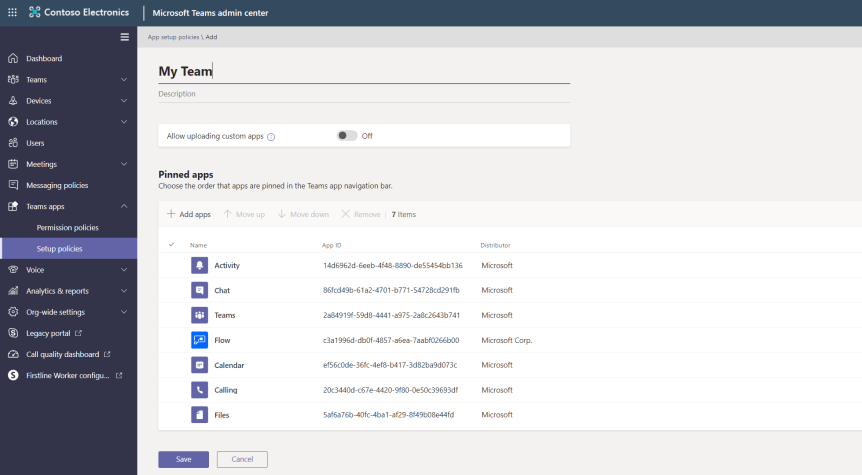
There may be an app your Team frequently uses. For the purpose of this article lets take this app to be Microsoft Flow where the Team is repeatedly adding Flows between apps such as Forms and SharePoint and Twitter and Powerapps across multiple Teams. They could always add Flow as a Tab to a particular Team, but with the increasing amount of Teams this wouldn't make much sense as the Team members would have to remember what Team, or - as is more likely - they are now adding Flow Tabs across multiple Teams which is littering Teams with Tabs which don't necessarily need to be there.
 @Microsoft365Pro