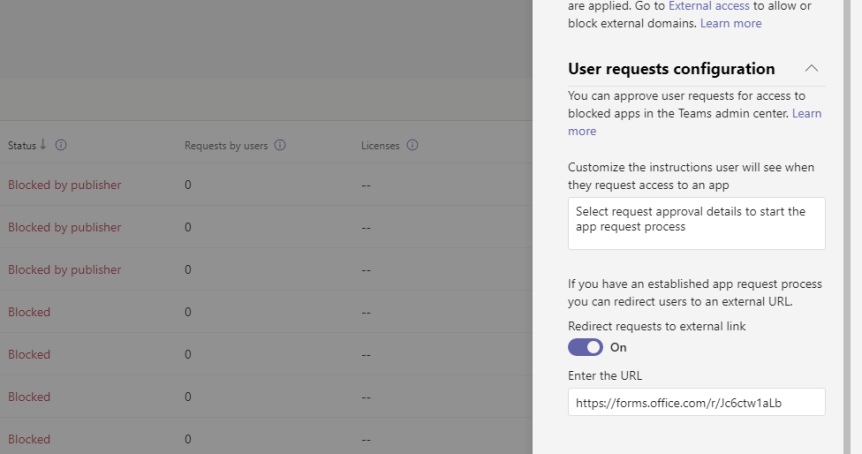
Teams now has over 1,700 apps which are integrated and available to manage via the Teams Admin Centre. This is scary because - to me at least, I can measure the passing of time based upon that number. I can remember saying in one conference that Teams has over 300 apps. In another, Teams has over 500 apps. 700. 1000. You get the picture. And in that time, we've seen functionality introduced such as permissions and app setup policies, the ability to block apps, the ability to control custom apps. We've seen attestation, app settings, the ability to buy subscriptions for apps via the TAC and a complete facelifting of the store to which you can now customize. This week I am going to look at a new functionality for users needing to request use of a blocked app. Back in the day - when an admin blocked an app - that app would simply disappear from the app store altogether. Microsoft changed this experience because if the apps disappear completely, they posit it actually encourages Shadow IT and self-sign up outside of the ecosystem leading to sprawl, data leakage and issues with data sovereignty. So, the current experience as it stands is that users can now see the blocked app; but request it from the admin. The admin then has to permit it use. Now, the new functionality we are concerned with allows the admin to set a workflow to direct the user to an external system to perform the request as opposed to it running through Teams. With such a detailed explanation you may think this sounds like niche functionality, but actually this is quite an important part of governance. We are fixing one problem with visibility, but we also need to make it easy for admins and organisations to make a judgement call on the use of that app

 @Microsoft365Pro