
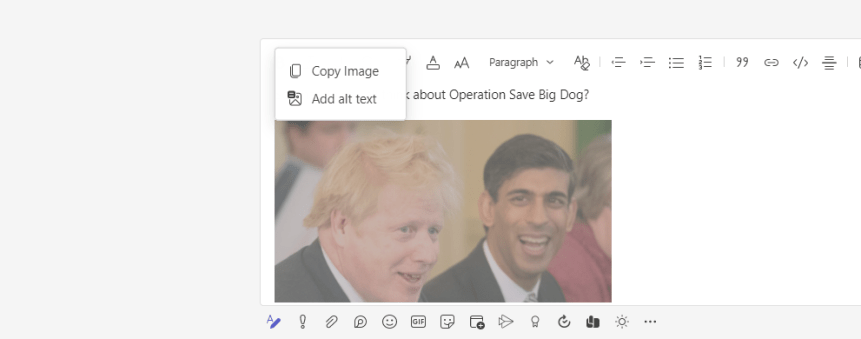
I have a lot to look forward to this week. Having just finished Global Power Platform Bootcamp 2022, Canadian Cloud Summit 2022, a Job Task Analysis for MS-900, having delivered MS-900, SC-900, Teams Phone and many other things besides, I look forward to a week of nothing - as in nothing in particular, nothing time sensitive hanging over my head like the proverbial sword of Damocles. Of course, there is always Teams Nation - and things could always change by Tuesday, but the outlook - by and large, is sunny. Now, there's a feature which has just dropped into Teams GA this week which you may have not even noticed has been added. I did. This is because I've been aware of it for about the last two months so I've been checking the 3.6 every week when I've come to write a blog. It's a small but vital add. It's an accessibility add so I feel I have an obligation to call it out. I won't harp on about how my appreciation for accessibility features within Microsoft 365 have grown over the years - and admittedly I am still learning to use them more consistently with others - but needless to say there are 1 billion people in the world who live with a disability so its really quite essential that the tech we use must be designed for, and embrace those with a sight or an aural disability, those who are neurodiverse (E.g. dyslexic), those who have learning difficulties, mobility difficulties such as dyspraxia, or those who live with mental health conditions with depression, anxiety or ADHD. So in addition to what's already available today, I was really happy to see Alt Text for Images in Teams finally ship - although at the current time it seems to only be in GA/Preview for Private Chats. Channel conversations aren't there yet. Still, it's a start. So what is Alt Text? How do we apply it?
[Archived] Teams Real Simple with Pictures: You want to block your own users being guests in other tenants? Well, now, you can with Cross Tenant Access Settings
![[Archived] Teams Real Simple with Pictures: You want to block your own users being guests in other tenants? Well, now, you can with Cross Tenant Access Settings](https://microsoft365pro.co.uk/wp-content/uploads/2022/02/image-46.png?w=863&h=0&crop=1)
This series on Teams has been running for a while now - about two and half years. And during that time I've returned periodically to the subject of guests. Enabling/Disabling Guest Access in the TAC, purging from Azure AD, Self Service Removal, Sensitivity Labels, Entitlement Management. In the last few months I have covered Terms of Use, B2B Management Policy to block guest invitations and regulating guests with PIM and RBAC. But the perennial question - the elephant in the room as it were - has always been this "I have the tools now to control adding guests to my tenant but how can I - as an administrator - prevent my own users from joining other tenants as guests" How can I control that? Block that? Up until this point we would typically say one of two things. One - it's the responsibility of the destination to control guest invitations even though typically we know from our own field experience that many orgs are always very active when it comes to guest management. Number two. It's by design - and if we simply turn off Guest access lock stock then we shoot ourselves in the foot collaboratively. But reaching for that security and compliance hat as I have so often done of late, there is legitimate reasons that we may want to stop our own users being guests in other tenants. What if a competitor invites one of our users into their tenant to collaborate on something they aren't supposed to? What is our users were spending most of their time as a guest in tenants that have nothing to do with our business? What if I as an admin want to limit certain users who are prone to accidental data leakage, or what if we just wanted to limit overall sprawl? So it should please administrators that we now have Cross Tenant Access Settings (CTAS) in preview which can do what we need. CTAS is defined as giving granular control over how external Azure AD organizations collaborate with you (inbound access) and how your users collaborate with external Azure AD organizations (outbound access). We'll focus on outbound access in this one. To note right off the bat, this is designed to work with other Azure AD organizations - if for example you are working with other organisations who are non-AAD or have personal domains you'll need to use Azure B2B Management. You'll need Global Admin or Security Admin roles to configure - and AAD P1 licencing if you want to go granular with users or groups.
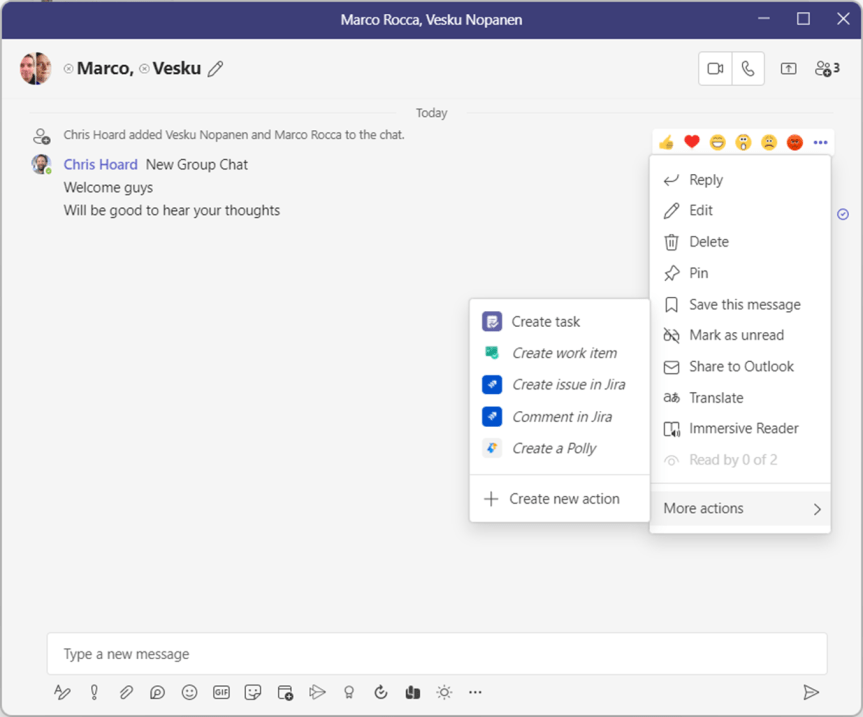
Teams Real Simple with Pictures: The Microsoft 365 Admin App is here. In Teams.
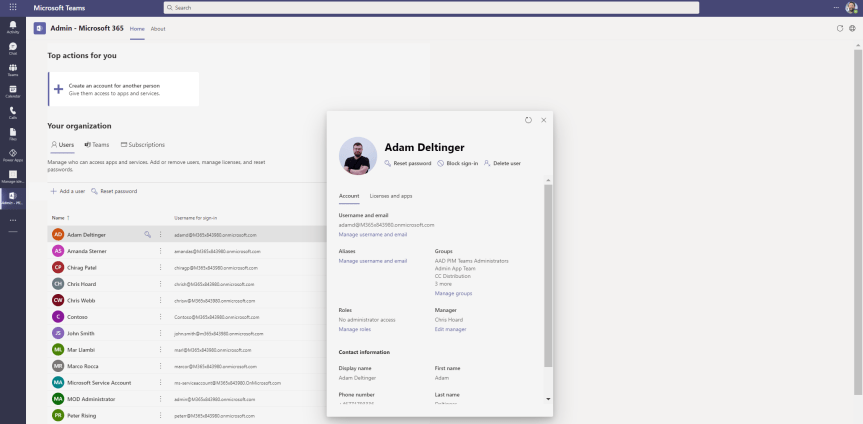
In a couple of days time I'll be presenting on Microsoft Loop at the Modern Workplace Conference in Paris (MWCP). It's my second time lucky. I am very proud to be returning to such a prestigious event given it was the one that got me interested in the circuit in the first place. Vesku and I will be teaming up again once more. Last year we talked about Teams as a Platform. This year I guess you could say we are also talking about Teams as a Platform exploring Loop Components, their intricacies, and other aspects we've investigated like compliance and flows. It's all very exciting given that they are only just rolling out into Ring 4 (GA) from preview. Now, earlier today whilst doing the prep work something caught my eye. You know the score. In the ever changing landscape of cloud apps things pop up out of nowhere. But this I had to do a double take on. The Microsoft 365 Admin App - yes, the admin app as in the awesome one you get on your phone via the apple store to manage aspects of your tenant and review service health - its now surfaced into Teams. Now before I start getting too carried away I am sure as a v1.0 it isn't going to have parity with the current admin app, or anywhere near the web version. So even before looking at it I am going to set my expectations low. But imagine. Imagine how handy considering how much we work in Teams if you could just spin up a user or a Team by launching it off the app rail. Also, on first thoughts, it's probably not an app we are going to want to make accessible for the majority of our users in Teams so we'll probably need to whip out some app permissions policies considering these things get launched with a default of on.
[Archived] Teams Real Simple with Pictures: Governing Guest Access via Azure AD Roles and PIM
![[Archived] Teams Real Simple with Pictures: Governing Guest Access via Azure AD Roles and PIM](https://microsoft365pro.co.uk/wp-content/uploads/2022/01/image-31.png?w=863&h=0&crop=1)
Last week, after I wrote the previous article on B2B Management Policy I had a nagging feeling that I wanted to write something more. It was in the back of my brain I just couldn't articulate it. Then during this week when I was teaching SC-900 and doing labs with Azure AD I remembered. Then, me being me I forgot it again. It's been that kind of week. But sitting in the restaurant today at Wagamama whilst eating a load of teriyaki soba it all came flooding back: it was a complimentary piece to B2B management on how we can restrict adding guests based upon external identities and leveraging Azure AD roles. Last week, we saw how you could out and out block specific domains, which meant that guests from those specific domains cannot be added. This week, we are going to see how you can stop Teams owners from adding guests unless they have a specific Azure AD role assigned called Guest Inviter. This has two real benefits. The first is that it stops Teams owners backdooring guests when you have implemented Entitlement Management because setting up EM doesn't suddenly strip Team owners of adding guests directly in the team itself via manage users. Secondly, because Team owners no longer have standing access to invite guests and you are basing that functionality upon assignment of an Azure AD role, you can now run it through PIM and this would go well with an access review. Now it would certainly be what you could call an EM light approach. The upside would be you no longer have to deal with catalogues or packages which removes a layer of complexity. The downside is that with EM you can package multiple Teams/Microsoft 365 groups/SharePoint site at a time: what follows wouldn't be able to do that. Still, it gives us another tool in the kitbag should we want. It also works from the perspective of not having to purely rely on having to use sensitivity labels to block guest access to specific teams, since Team owners won't be able to do that unless they have the assigned role - and then they could be used anyway. So in short, this facilitates EM through to its full conclusion or an alternative approach which isn't so rigid as EM, but still puts controls on users adding guests carte blanche.
 @Microsoft365Pro