

Last month I wrote a bit about the new Power Apps Templates in Teams - Bulletins and Employee Ideas, and last week I discussed Applying DLP policies to the environments these apps are housed in. Now It feels pretty natural to continue this conversation about data and discuss Table Permissions within the apps themselves. This is because it's these permissions which determine how users inside and outside the team - and guests - can work with the apps and the data that they contain. Firstly, it's important from a usability perspective that we can granulate access. Think of the following scenario - one team member needs full access over one app in the environment because they are managing it whereas that same user may only need read access over another because they don't need to touch any data within it or add any data to it. You may also want team members to be able to modify data with a specific part of the app - for example links in Bulletins, and not in others. This is all possible with table permissions. Secondly, it's also important from a security and compliance perspective. We want the users we need using the app in the way we specifically need them to use it. Circling back to the DLP conversation last week whilst we want to trust that others will handle the apps and the data within them in the right way, having carte blanche in terms of permissions, or even having permissions for certain users, or guests, at all opens things up to all sorts of risks including insider threats. Like DLP, this is certainly something we want to think about when we deploy, or when we are sharing it outside the Team
Teams Real Simple with Pictures: Using Data Loss Prevention (DLP) to stop data leakage from Dataverse for Teams Apps such as Bulletins or Employee Ideas

Last month, I wrote a bit about the new Power Apps Templates in Teams - Bulletins and Employee Ideas. I really liked them. They are really useful for bringing in new functionality for Teams and filling some gaps, they can be used by both users inside the Team where they are deployed or outside of the Teams via the broad distribution functionality. They can be extended by developers looking to build on the functionality which already exists. However, in thinking about how these apps can be extended we must also put our security and compliance hats on and think about how the ability to extend them can be controlled - particularly in terms of connectors and data leakage. You see, when we start using these apps we will begin adding data - company data. In the case of bulletins we add things like company news, URL's and even contact details. In the case of employee ideas we add ideas about how the company may improve and these ideas could - for example - be based on company data or expose where the company is lacking. Whilst we like to believe that everyone who has access to modify these apps have the best of intentions, it is too big a risk to simply assume that data will never be exposed - accidentally or maliciously via connectors to places where it shouldn't be seen to audiences who should not see it. A good example is Twitter. Our data makes it onto Twitter it could seriously damage our brand and we could be facing some legal consequences
Teams Real Simple with Pictures: Using List Rules and Exchange to keep the Team up to date on changes
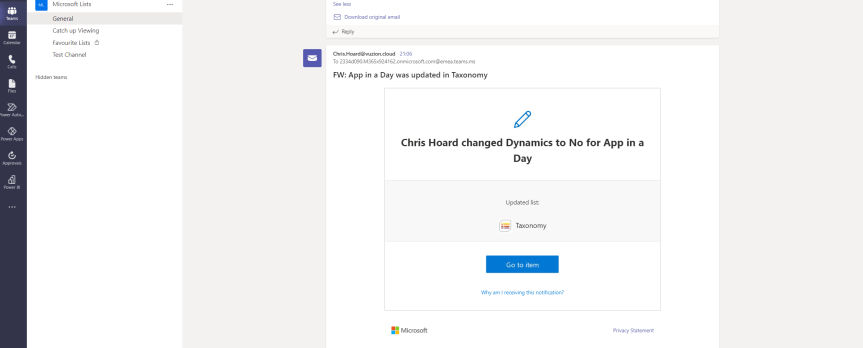
It feels good to be back on a somewhat even keel. Winter has been absolutely crazy - and after the Microsoft Teams Winter Tour and Ignite I had to take a short break to play what I call the containment game. You know the one. Batting everything out whilst simultaneously closing everything down. It's stopping that accumulation of work from getting out of control. I am happy to say that's now done. I won. It's back to business as usual. So what should we talk about first? There is a lot of things given that Ignite is now over - and if I were others maybe I would go for the latest and greatest, yet having wanted to discuss it since it's recent release and having had no bandwidth to do so I have settled on List Rules and how we can notify the Team of changes to the list. Something straightforward and doesn't take long to write home about. So Rules. Rules are defined by Microsoft as having the purpose of 'automate [ing] tasks such as sending someone a notification when data changes in the list'. In other words, they are very likely replacements for Alerts which have been around a long time and are legacy functionality stretching back to classic SPO and SPO Lists. Now, this blog won't cover every possible scenario for a rule. There's no point - it's super simple and as you go through this blog you'll see how easy it is to implement rules. What I am more interested in is notifying the team of changes rather than individuals: either in Teams or via email. What's that? This can be done by Power Automate and we could create a flow and do it that way. Absolutely. Yet this would suggest whoever is implementing it knew how to do that and had the time and inclination to do that. For me, a lot of what I hear is people want to just do things there, on the List. So Rules for simplicity, Power Automate for anything more
Microsoft Ignite 2021: My Sessions, 10 for Teams and Everything Else I’d Recommend
Microsoft Ignite is back. It's been 6 months since the last one - and if I am being honest, it feels like the last one only took place last weekend. Of course, in many ways the last one was really the first - the first in lockdown, the first where it wasn't possible for us to attend in person - but it was also the first to surpass 70,000 attendees as the remote experience opened it up to a much larger audience who otherwise wouldn't have been able to attend. But whether this one constitutes 'Ignite Part 2' or is a singular replacement for Ignite the Tour, we all find ourselves returning to the biggest IT pro event of the year at a different time: both in terms of the calendar and in terms of more optimism as we may begin to see a return to a degree of normal life as we know it this year. I, for one, am very interested to see Microsoft's take on the state of things. Last year, see heard a lot about resilience, about being digital responders and we saw narratives such as accelerating digital transformation to the cloud for business continuity and supporting remote workers as they deal with a spectrum of challenges, including emotional and mental well being. Will we see a continuation of these narratives or will we see a pivoting of this? Jared Spatero's session The Hybrid Workplace suggests we will and where Microsoft think we will all be operating post pandemic. But what is intriguing is Satya Nadella's keynote which will be held on AltspaceVR. As much as showing the power of technology and mixed reality, how does this feed into the narrative, and like AI, how in the years to come will we all be using mixed reality day to day within our hybrid workplaces to connect, and get work done. What's clear from the last year, is we no longer have to be there, and so doing, we ultimately - if we are true to ourselves, may find it is even better than the real thing.
Teams Real Simple with Pictures: Hands on with Employee Ideas
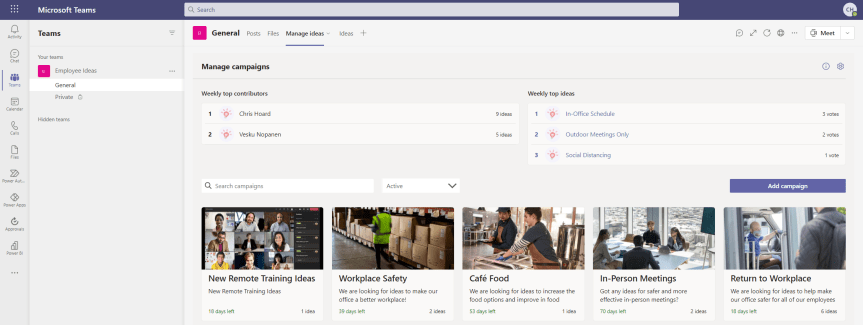
The last blog I did was on Bulletins. My good friend Vesku Nopanen responded in kind with Milestones. So I thought I would just go on to talk about Employee Ideas. Like Bulletins and Milestones, Employee Ideas is an app in the Teams Store which is built upon Dataverse for Teams. It's part of a new wave of Power Apps which can be deployed and then extended giving users a leg up as opposed to having to create something from scratch. So what's this one all about? Well, the description in the screenshot below outlines it pretty well: it's about creating and managing and voting up ideas in the team. Ideas for improvement. Ideas for change. Ideas for how to be more inclusive. For me this is a pretty cool for two reasons. The first is that I often have ideas but have nowhere to put them. Me being me I typically leave them in notepad or on an open excel, then I'd lose them or they would be buried in notes where I would never find them. I must get to a better place then ideas either being in OneDrive or in my head because if you are like me I am very forgetful. Maybe that's just my age. Secondly, I love the prospect that this could potentially be used similar to Uservoice, particularly when it comes to crowdsourcing innovations or improvement actions. Let's get great ideas teamwide, let's not have a monopoly or self identify as having the best. Now, as far as I know the Employee Ideas app came out sometime around November/December 2020 - but I could very well be wrong about this. Bulletins and Milestones are the newer apps, but these have all been close enough together they could be considered in the same wave. Most I talk to don't realise that they are even there, so are probably going to get discovered together. Let's get hands on with this one.
 @Microsoft365Pro