
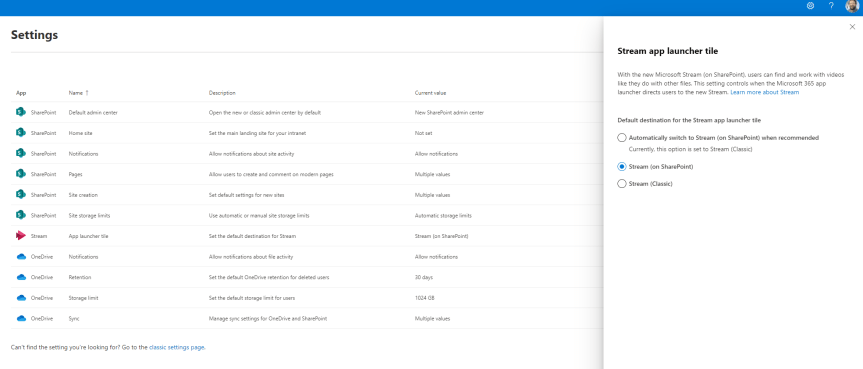
Hope your enjoying the Jubilee bank holiday this weekend! After taking my five year old to a two hour - yes you read that right - two hour pantomime today let's just say I'm 99% there on the old cognitive load. I'll be giving the BBC coverage of Party at the Palace a miss. I'll be giving TV a miss. In fact, I'll be enjoying silence in the most myriad and profound kind of ways. So in order to unpack I'd thought I do a quick blog. A virtual commute as you will. Into nothingness. In 45 minutes I am going to discuss how an org can direct to the new Stream on SharePoint experience for their users in office.com - which I see has now dropped into Ring 4 in a test tenant. It was only a few weeks ago - maybe a month - where I discussed the new Video Chapters. A few months prior to that I discussed how it was possible to use the URL steam.office.com to get to the new web app experience. The point is with the introduction of the web app and the player I feel we are moving towards a tipping point in the transition from classic to Stream on SharePoint. I feel we are starting to get to the good stuff. So what is this blog in particular addressing? Well Stream in the App Tile Launcher - what you and I know as the Waffle - in office.com continues to direct to classic (https://web.microsoftstream.com) whereas you can now set it in the SharePoint Admin Centre to direct to Stream on SharePoint (https://stream.office.com). As much as users knowing the URL it's never going to be as memorable as just redirecting via the App launcher. So let's take a quick look, as there isn't much to do - rather you just need to know where to switch it. Later on, I am sure it'll become the default
Tag: Stream Web App
The new Stream Web App is here. I found it! And it supports Teams Meeting Recordings
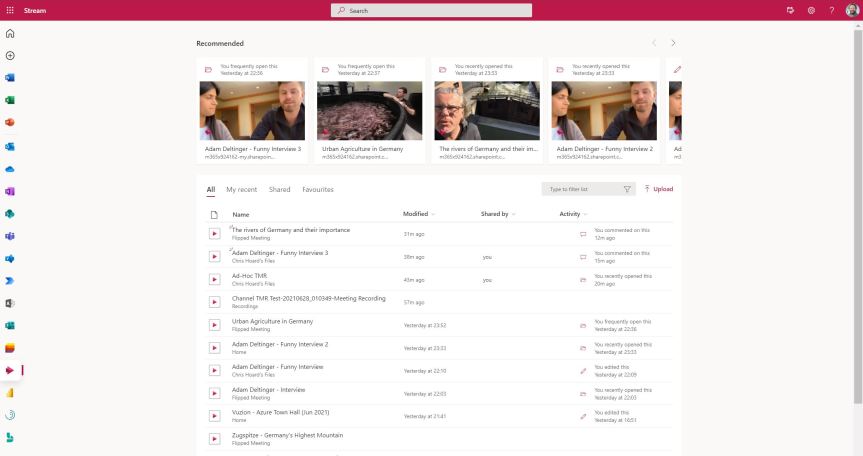
given that I pretty much liked everything about Stream: the web experience, the mobile experience. Both were easy to use and did what it said on the tin. It had started to have great features like trim and screen capture. It could be brought into Teams in a number of ways - and kudos has to go to the Stream Team for how hard they must of worked on it; creating a strong app which was really taking off and really focused bringing out the best in video. However, on the other hand whilst recognising all of this; pivoting made a lot of sense. There was a growing amount of noise and frustration from the tech community about not being able to share video externally, about not being able to apply common compliance functionality such as retention. Since Stream had it's own completely separate storage many things had to be developed separately. Whilst I know there was plans to do this - ones which were very near to completion since I was involved in roundtables previewing the functionality; in a world where apps like Microsoft Lists were being designed to work right across the stack leveraging existing storage on SharePoint and OneDrive and existing security and compliance functionality; Stream felt outside of that almost moving in the opposite direction. So 'bringing it into the Microsoft 365 stack', the idea that a video 'is a file just like any other file' won out. And what did that mean? Stream 2.0 would pivot to become the player across the Microsoft 365 stack. SharePoint and OneDrive would house video files. There would be a new personal web app, a new player and video 'portals' which could be created on SharePoint. Now, in the time between Ignite 2020 and now much has focused on things such as recordings, changing the default location to SharePoint and OneDrive and CDN support. We know that the new player is coming soon due to it hitting the message centre. However not much has come out officially about the web portal and when we can start using it. Tonight, out of sheer curiosity I had a go at amending an URL since this worked previously for Lists via OneDrive. The new Stream portal is already there. This wasn't in a TAP or preview ring. This was in a Ring 4 GA tenant. Let's see what we can do
 @Microsoft365Pro