
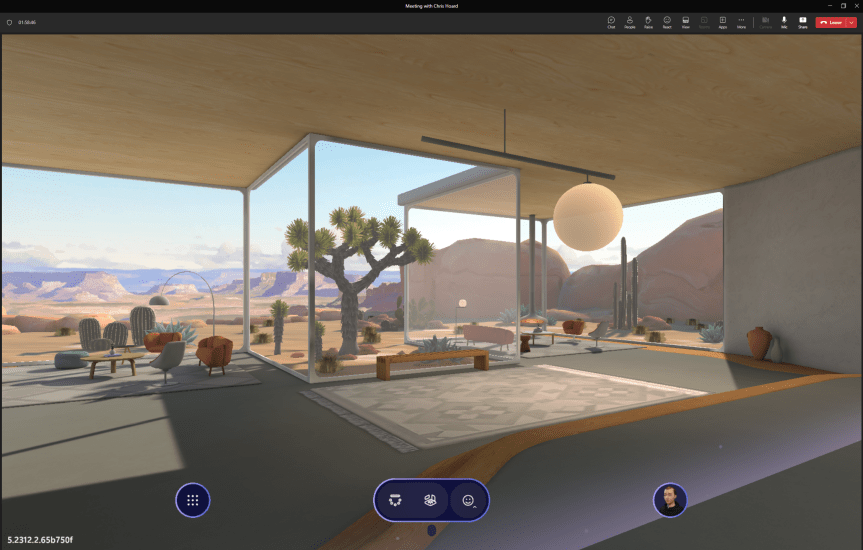
Last week we looked at the new Town Hall functionality set to replace Teams Live Events. And as promised we are going to venture again into the meeting/events space by looking at the introduction of Mesh Immersive Spaces into public preview. For many, these spaces will constitute the next step forward with Microsoft Mesh after the introduction of Avatars into Teams. But what are they? By definition they are 'three-dimensional (3D) immersive space(s), helping virtual meetings/events feel more like face-to-face connections. [They] have unique attributes that create a perception of being physically together [with]in a 3D digital space, including spatial interaction, co-presence, and immersion' (Microsoft, 2023). In other words they are designed to be active meeting experiences as opposed to passive, and to have a level of immersion which you may not get from a standard Teams meeting, or even an in person experience. And whilst on the face of it they may seem to be a natural fit for remote workers or orgs which operate in hybrid in order to equalise the meeting experience, they are very much as you will discover applicable for all. If you have ever used platforms such as the recently retired AltSpaceVR you may already be familiar with such an experience in principle. Now it is here in the Microsoft Teams classic client; soon to be 2.1. It's time to try it out - and I am pretty sure I'll be writing many more blogs on Microsoft Mesh over the coming year as this is just the tip of the iceberg. Its good to see Microsoft prrogressing with their Metaverse offering.
Author: microsoft365pro
Teams Real Simple with Pictures: Goodbye Live Events, Hello Town Halls
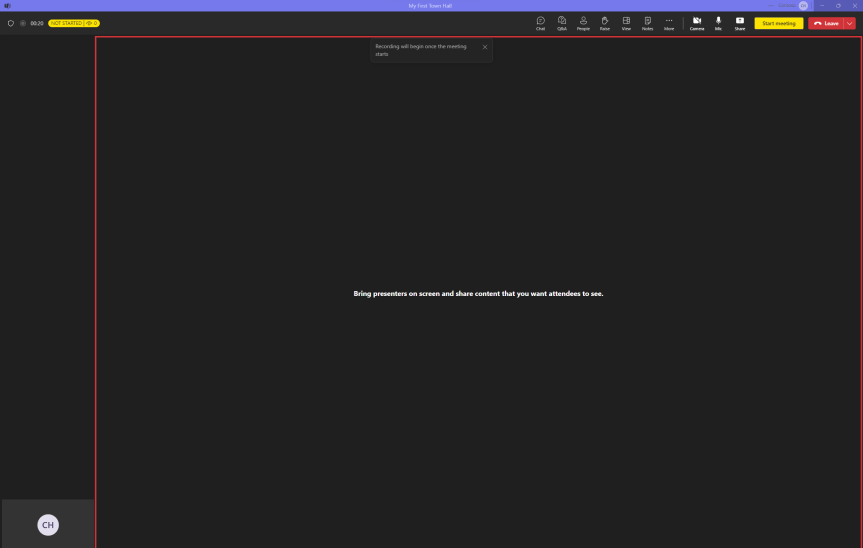
Gran Canaria was awesome. It had the weather. It had the rugged scenary. Good hotel. Good food. And we got plenty of time with our son in the pool. So we very much got everything that we could ask for. But as is the way of things this year it flew by way too fast; and so here we are one week back and ready to get the blog underway. So in that time what's happened with Teams? A lot. Teams 2.1 went GA. Microsoft is gearing up for Ignite and Immersive spaces for Mesh is now in public preview. I'll cover all of these things soon. But I wanted to focus first on the announcement that Live Events is now in sunset and will be retired in September 2024. What is replacing it? Town Halls. Defined by Microsoft as 'a new experience to host and deliver large-scale, internal events to create connections across an organization', this will be a unified experience with the standard Teams Meeting. Out of the box functionality will include 10,000 attendee capacity, the ability - like standard Teams Meetings - to run for 30 hours; and there can be 15 concurrent instances at once. We can see that it already has much of the functionality we have come to expect from Live Events: Q&A, on demand recording, co-organiser support, support for hard mute, live translation, live transcription - so it can effectively run like a Live Event today and has that same one-to-many focus. Saying this, parity isn't there yet as at the time of writing it's missing features such as as RTMP Out and external presenter. Indeed, some functionality now requires having Teams Premium: for example the ability to scale up to 20,000 attendees, the ability to run 50 concurrent instances and eCDN. Thinking about these things all up was Town Halls and the transition from Live Events a recent development? No because it was either Ignite 2020 or 2021 where it was said live that they were going to converge the experiences. And since Live Events was a completely different platform under the hood it made sense to get shot of it, if anything because it was probably reaching limitations. But the real question is - will they be used more than Live Events? I am going to play my get out of jail free card and leave that question to you since I just got back from annual leave...
Teams Real Simple with Pictures: Silencing @Everyone mentions and preventing replies to posts in general channel in Teams 2.1

Ok - 10 days to the holiday now. And I'm in the thick of things trying to get everything tied up: all the deliveries, all the day-to-day, all the testing, all the DevOps items, the logistics, dog, you name it. And to be honest? It would probably be easier - and saner - to put the blog down for a few weeks. But I love doing it, so if I can squeeze a blog in then I will. And this week I am going to pause from Teams and Entra, and pivot to a few end user functionalities which came about through just playing around in Teams 2.1. First, this is the ability to silence everyone mentions, and second its the ability to prevent replies to posts in the general channel where even I found out something new about Teams. Now why would I want to do these things? Well, they make Teams less noisy. In the case of the everyone mention it triggers notifications for everyone in a group chat (they are not in channel conversations) and in my experience some who become aware of them begin to use them as a means to draw people's attention to what they want. Oh we've seen that over the years through features such as priority messaging and channel mentions. Yes. We know it can save your time and effort - just as it can be disruptive to my time and effort especially when I am in the flow of the work. In the case of stopping replies to posts in the general channel we've had the ability to restrict replies to posts in standard channels via channel moderation for some time. We've also had the ability to restrict posting in the general channel. However, we've not had the ability to stop replies to a post in the general channel. Given that general is often the primary/landing channel for the team its ideal for things like team updates, announcements, and mod-led instructions. In other words, replies are often neither required nor needed and are - in many cases - an opportunity for noise. So this will work for the general channel, indeed it'll work for any channel including private and shared. It still won't stop the ability to post in private and shared, but now we can limit both posts and replies in general and standard, and replies in all channels. So I personally think both of these are good steps forward. Do more with less noise.
[Archived] Teams Real Simple with Pictures: Deploying Microsoft Entra Internet Access in Preparation for Teams
![[Archived] Teams Real Simple with Pictures: Deploying Microsoft Entra Internet Access in Preparation for Teams](https://microsoft365pro.co.uk/wp-content/uploads/2023/09/image-15.png?w=863&h=0&crop=1)
Ok - 17 days to the holiday and counting! But before I get to a beach on the Atlantic one of the things I really wanted to do is ensure I get the opportunity to get a blog down on Microsoft Entra Internet Access. I think it's going to be an important solution moving forward. So this begs the question - what exactly is it? And why do I think it's important? Microsoft Entra Internet Access (MEIA) is part of Microsoft Entra Global Secure Access service defined as 'securing access to Microsoft 365, SaaS, and public internet apps while protecting users, devices, and data against internet threats...". Announced alongside Private Access at the Microsoft Entra moment prior to Inspire back in July, it's an '..identity-centric, device-aware, cloud-delivered Secure Web Gateway (SWG)' which is part of Microsoft's SASE/SSE strategy alongside Defender for Cloud Apps. Chances are you've already seen something like this from the likes of Z-Scaler and Palo Alto. But this is Microsoft's proprietary gateway built right into Microsoft Entra. That's awesome. But aside from being a net new proprietary feature what's its value? The importance of the SWG is, amongst other things, its ability to prevent attacks such as token replay attacks and attacker in the middle (AITM) attacks by ensuring conditional access to Microsoft 365 services through compliant networks and endpoints. Therefore, as attacks are becoming more sophisticated and we are seeing things such as token theft to breach tenants, or bypassing MFA, new defences such as a SWG are as timely as they are necessary. For me? This could become as fundamental as MFA and Conditional Access. Now at the time of writing this solution is actively being developed and Teams itself isn't supported. But we know it will be. And it will be soon. The point is this shouldn't be a blocker to implementation - it'll still cover Exchange, SharePoint, OneDrive and other things such as the Graph so let's not wait - let's get it in for Teams. So this blog is an exploratory one. It's the tip of the iceberg and you'll want to investigate your own scenarios, read others blogs and bear in mind that whilst for Windows only, it'll cover more in the future. I know this is something that we'll be collectively working on and writing more about in the future.
[Archived] Teams Real Simple with Pictures: Making Teams Just in Time with PIM for Groups
![[Archived] Teams Real Simple with Pictures: Making Teams Just in Time with PIM for Groups](https://microsoft365pro.co.uk/wp-content/uploads/2023/08/image-78.png?w=863&h=0&crop=1)
So I booked a holiday to Gran Canaria last week. The positives: time with the family, late summer sun, changing it up with the scenary and a great package and price. Negatives: it's on 20th September so large parts of my workload are now super time sensitive. It's going to be wild. For real. But here on the bank-holiday weekend in the UK I've got a little time to write: and today I have decided to do it on the idea of making Teams Just in Time (JIT) which, I guess, is a concept very applicable to my own situation. So why would we do this? Well, one of the issues we have in Teams is that we don't need access to all Teams all the time, and also we have access to Teams that sometimes we don't need to have access to all the time. In other words, there could be reasons why we need Just in Time access, and not need whats called standing access. For example, I need to access a Team for a day in order to access specific assets in that team, or apps built within that team. I am sure you can think of your own. Now, we could go down another route and use Entitlement Management, Access Packages and Access Reviews right? Yeah, we could. But let's say I only want to give access for a specific period of time, to do something specific and then the user is removed and has to apply again to be added to it, and that's all auditable at the same time. This is where PIM for groups will come into it's own, especially where Entra ID roles are group specific. A team which shows for a specific period of time to do what's needed and collaborate with others, and disapears again when the time limit is reached. I personally think this one is worth exploring as it could really change the way we think of Teams.
 @Microsoft365Pro