
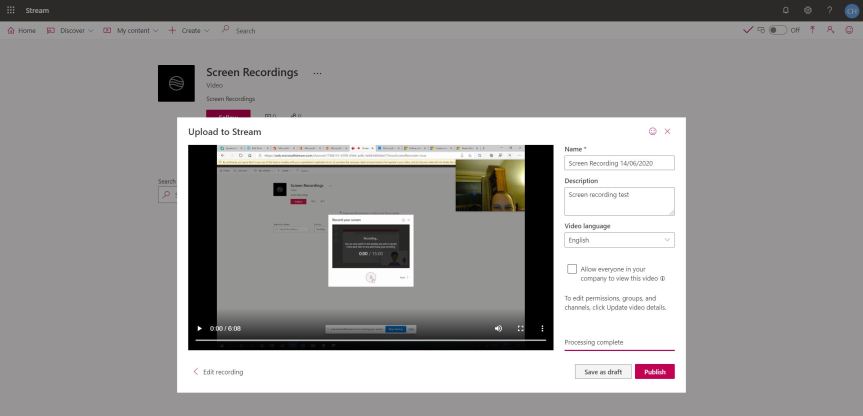
If I asked you to think of a scenario where you would use recording in the context of Teams, then I would wager that - today - you would probably say meetings followed by calls. Most people would - and that's as expected. Yet a month ago, the ability to record your screen was added to the Stream web app. Now, the ability to record video in Stream has been around for a few months in the mobile app but the big difference is that with the web app you can publish directly into stream channels after the video has been recorded. This functionality for mobile will absolutely come at some point - but today, it is important to know that because you can record and select a Stream channel whilst publishing, you can therefore publish directly into a Teams channel. Imagine - you need to show someone in the Team how to do something, or provide them with a canned demo, or provide the team with a video to analyse before a meeting. This is one of those key functionalities - like shared system audio - which kind of fly under the radar when they first emerge. Don't get me wrong here - its far from what it could be in the future being limited to 15 minutes, limited to Windows in terms of system audio and camera capture only possible when sharing the screen (as opposed to an app or browser tab). However, think of the future - when the 15 minutes limit is raised, when it's possible for macs, when camera capture is possible in all sharing options and when you have a set of editing tools. It's on a great trajectory
Author: microsoft365pro
Teams Real Simple with Pictures: Teams and Skype Consumer Interop is here
You know, Teams to Skype consumer interop is a really interesting one for me because for the longest time this functionality wasn't going to happen. If you ever came across or looked up the associated Uservoice you would have seen it as being declined by the product team - and its not difficult to understand the reasons why Microsoft did for so long. Skype for Business online ends July 2021. Many feel it's time to bid farewell to the Skype brand and move on. We get it. Many of us have, and many of us did so purely because of all the functionality and productivity adds Teams has over Skype. Except some organisations have held off precisely because it didn't interop with Skype consumer; they needed it to work with other orgs and customers in a B2B and B2C context. Microsoft - all credit to them - had to make a call, and that call was Teams had to interop going forward. A 180 this may be - but ultimately, Microsoft has got it right. Nostalgia and sentimentality aside, there shouldn't be any more reasons why an org should remain on Skype for Business online, but it's gives the upside that Teams users will be able to message and call customers, or loved ones which use Skype consumer, and vice versa
Teams Real Simple with Pictures: Getting Started with Bookings in Teams for managing virtual appointments
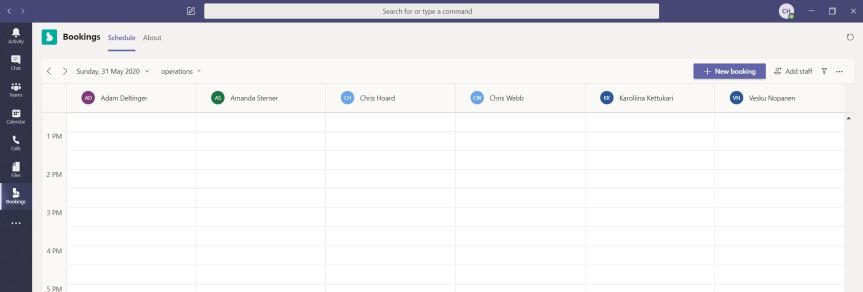
I have used Bookings for some time. Bookings came to Office 365 Business Premium two maybe three years ago as part of what was then called Office Business Apps along with several other apps such as Mile IQ. Most of them including Listings and Connections never make the cut. Bookings, however, was an exception. It's useful and it's always been ideal for Teams - except the integration was never there and it was, as mentioned, limited to Business Premium. Covid-19 and remote working changed that. Now in all Microsoft 365 plans, you are able to book virtual meetings for the Team. You are able to see bookings made by the team, and the fact that you can create a public bookings page where customers can book virtual meetings and consults with the team - and be surfaced in Teams, is very very useful. It'll work in most verticals, and I feel it's going to be one like Shifts - a real nice app but people are definitely going to want more real quick. See you in Uservoice
Teams Real Simple with Pictures: Keep up to date on your favourite YouTube Channels with Teams and Power Automate

If you have been following this long running series, it probably comes as little surprise that I love video. I love videos which are genuinely interesting and jam packed with useful content, well produced and palatable in terms of their length. Yet the one problem I have is that I do so much focus work these days that I always forget to check for updates and so I often end up missing out on some really great content. Of course, there was a period I used to check them. I used to spend too much time checking them every other day, regularly switching out of context which often took me out of the focus work I was doing
Teams Real Simple with Pictures: Rethinking Gif’s in Teams
It has felt like a very long time since I last sat down and wrote a decent blog. It was back on 26th April when I looked at the initial roll out of background effects. Not that long ago at all you say - but since then I have delivered at Microsoft 365 Saturday Madrid, Teams Day Online Germany, Microsoft the Tour Israel, Vuzion Power Platform Bootcamp and got myself involved in this little MVP training gig. I am also currently writing sessions for Microsoft 365 Marathon, Galactic Collaboration Summit and Commsverse and have multiple Fundamental deliveries in the next two weeks. All on top of the day to day.
 @Microsoft365Pro