

Last month, I wrote a bit about the new Power Apps Templates in Teams - Bulletins and Employee Ideas. I really liked them. They are really useful for bringing in new functionality for Teams and filling some gaps, they can be used by both users inside the Team where they are deployed or outside of the Teams via the broad distribution functionality. They can be extended by developers looking to build on the functionality which already exists. However, in thinking about how these apps can be extended we must also put our security and compliance hats on and think about how the ability to extend them can be controlled - particularly in terms of connectors and data leakage. You see, when we start using these apps we will begin adding data - company data. In the case of bulletins we add things like company news, URL's and even contact details. In the case of employee ideas we add ideas about how the company may improve and these ideas could - for example - be based on company data or expose where the company is lacking. Whilst we like to believe that everyone who has access to modify these apps have the best of intentions, it is too big a risk to simply assume that data will never be exposed - accidentally or maliciously via connectors to places where it shouldn't be seen to audiences who should not see it. A good example is Twitter. Our data makes it onto Twitter it could seriously damage our brand and we could be facing some legal consequences
Category: Microsoft Power Apps
Teams Real Simple with Pictures: Hands on with Employee Ideas
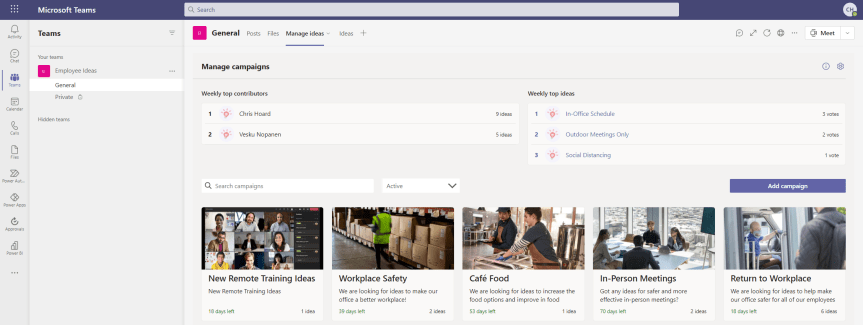
The last blog I did was on Bulletins. My good friend Vesku Nopanen responded in kind with Milestones. So I thought I would just go on to talk about Employee Ideas. Like Bulletins and Milestones, Employee Ideas is an app in the Teams Store which is built upon Dataverse for Teams. It's part of a new wave of Power Apps which can be deployed and then extended giving users a leg up as opposed to having to create something from scratch. So what's this one all about? Well, the description in the screenshot below outlines it pretty well: it's about creating and managing and voting up ideas in the team. Ideas for improvement. Ideas for change. Ideas for how to be more inclusive. For me this is a pretty cool for two reasons. The first is that I often have ideas but have nowhere to put them. Me being me I typically leave them in notepad or on an open excel, then I'd lose them or they would be buried in notes where I would never find them. I must get to a better place then ideas either being in OneDrive or in my head because if you are like me I am very forgetful. Maybe that's just my age. Secondly, I love the prospect that this could potentially be used similar to Uservoice, particularly when it comes to crowdsourcing innovations or improvement actions. Let's get great ideas teamwide, let's not have a monopoly or self identify as having the best. Now, as far as I know the Employee Ideas app came out sometime around November/December 2020 - but I could very well be wrong about this. Bulletins and Milestones are the newer apps, but these have all been close enough together they could be considered in the same wave. Most I talk to don't realise that they are even there, so are probably going to get discovered together. Let's get hands on with this one.
[Archived] Teams Real Simple with Pictures: Getting Hands on with Bulletins
![[Archived] Teams Real Simple with Pictures: Getting Hands on with Bulletins](https://microsoft365pro.co.uk/wp-content/uploads/2021/02/image-48.png?w=863&h=0&crop=1)
Happy Valentines Day! It's been a busy few weeks. I am in the middle of this thing called the Microsoft Teams Winter Tour. Basically, it's about ten conferences I am speaking at chained together throughout at the course of January and February. At the time of writing I have done seven. So three more to go - and all three come a week from today on the 19th in a triple header that'll see me speak in France, Italy and Nigeria all on the same day. To be fair its been incredible - but it's also been hard to keep up with all the new stuff coming out in Teams too - and there's been a lot. A lot of news and a lot of developments. So in the period between now and Ignite I am going to try and step back up and I'll start with something which seemed to fly under the radar which is bulletins. This is an app which appeared sometime last week and what interests me particularly about this is that its a Power App, one whose data is stored within Dataverse. Now Power Apps in Teams has massive potential - we all know this, we've all known this a long time. However, previously Power Apps designed by Microsoft typically came as either Teams Templates, or Power Apps Templates which meant you would need to customise and install them yourself as Custom Apps: in other words they weren't already available out of the box from the Teams App store. Is this a new direction? Have Microsoft seen the best way to get into Power Apps is to actually go from the position of using them then customising them? Well, yes. Read the description below - 'it's then easy for an org to go on and extend the core functionality'. Clever Microsoft. Oh I see you. But let's talk about Bulletins. It's an app that's designed to keep Team Members informed in terms of broadcasts and announcements. FAQ's also. Now I can only imagine some within the Yammer community are going to have something to say here - but before we mosey on down to Defcon 1 in regards to apps which dupe functionality, let's have a walkthrough and deploy this and see how we go. Personally, from the description I think this could be good. On the other hand, I also think it could go really bad if people don't understand about storage
Microsoft Power Platform Fundamentals (PL-900) Exam Prep Guide
Analyse, Act and Automate. Buzzwords these may be - but the importance of the Power Platform is real. About a year ago, I was sitting in a meeting in Dublin discussing Microsoft 365 with a partner whose business was built upon Power Apps. As much as I was impressed with the app on the IPad they'd recently developed after their receptionist left, it was the dawning on how they viewed Microsoft 365 through the prism of applications. It's very easy to narrate a story on Microsoft 365 around Security, Teamwork or the modernization of devices (three narratives Microsoft typically use today). But I had never considered doing that based upon apps. Never even entered my head.
 @Microsoft365Pro