
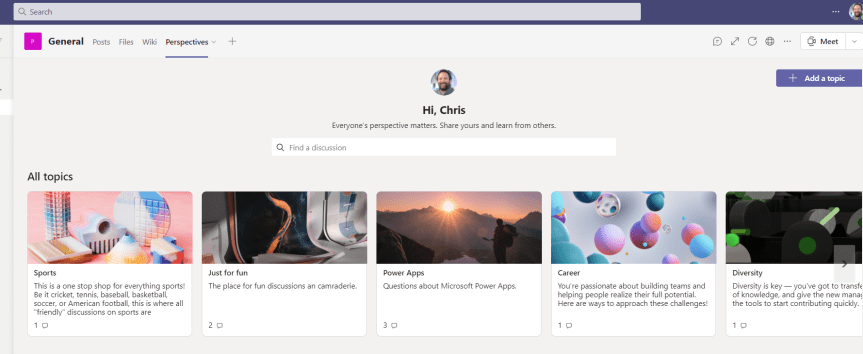
Today at Microsoft Build it was great to run a Table Talk with Vesku Nopanen, Reza Dorrani, Mar Llambi, Karoliina Kettukari and April Dunnum. Lots of people showed up. I think - and I say think - we answered most questions. The chat was moving so fast that Reza, Mar and I were leapfrogging each other trying to answer them in time. There's a lot of interest about Dataverse for Microsoft Teams - particularly the apps which can be installed in them and extended with by Fusion Teams - Teams which are mixes of citizen and professional developers. Now some of these apps you may already know and used, and some of them I have already written about: Bulletins and Employee Ideas. There's Milestones too and a few others. Today, at Microsoft Build, three more were announced. Profile Plus, Perspectives and Boards. Over the next few days I am going to write about all three and all three are available in preview. Today I am going to cover Perspectives.
Category: Microsoft Teams
Microsoft Build 2021: My Sessions, Teams and Everything Else I’d Recommend

This has to be a quick one. In just a few hours time - straight after Satya Nadella's keynote I am on and in a Table Talk concerning Dataverse for Microsoft Teams, and having just returned from annual leave yesterday and teaching Microsoft Teams Fundamentals all day long, it's been an absolutely crazy last 48 hours. So Build. I love Build. As an IT Pro people have often asked me as to why I like Build considering I am not a developer. And the reason is not because it's online and free. Nor is it because I am a huge advocate of Microsoft. Build is Microsoft's principle event of the year aimed at developers - and whilst I am not a developer and will probably never think of myself as even a citizen developer even though I work quite a bit now with the Power Platform, for me the real value is twofold. First Build is in the broadest sense of someone involved in technology an event all about passion for innovation, for technology which can help others and make our lives easier. People come together, young and old, from every background, for the general good, to solve problems, to take things to the next level and redefine the art of the possible. In that sense, Build is the most positive and aspirational of all the Microsoft events. To me, it says I can make a difference. I can create something which matters to people. Secondly, Build is often a bellwether for what is going to happen over the course of the next year. Build sits pretty much at the end of Microsoft's financial year, and what we see in Build is Microsoft is really starting to think about what it wants from the next fiscal which starts in July, where it want's developers to focus and where it's own developers are focusing. There is many insights we can glean before we get to Inspire and before he head onto Ignite. I tend to think of it now as the beginning of Microsoft's event year.
Teams Real Simple with Pictures: Setting up Supervised Chat in Microsoft Teams

Many years ago when I did my teacher training here in the UK one of the things I was taught is the concept of 'in loco parentis' - latin for 'in the place of the parent'. Legally, whilst not bound by parental responsibility, teachers are expected to behave as any reasonable parent would in promoting the welfare and safety of children in their care. The term dates back to the 19th century when courts were first identifying and constituting teachers' responsibilities. It was during this period where case law established that a teacher should act "as a prudent father" - language which may not be so fit today, yet the idea of safeguarding transcends this vernacular typical of it's time. Supervised chat - a feature I didn't know even existed in Teams until a few days ago, is predicated on this idea of safeguarding. As outlined in the notes 'Supervised chat allows designated educators to initiate chats with students and blocks students from starting new chats unless an appropriate educator is present. When chat supervision is enabled, supervisors aren't allowed to leave chats and other participants aren't allowed to remove them, ensuring that chats involving students are properly supervised'. In other words, it's removes the conundrum of having private chat on or off in an education environment. On? Many teachers, parents and stakeholders would consider it dangerous in that it opens up a number of risks including harassment, bullying and non-educational content. Off? This blocks teachers, or learning support from reaching out to students privately for personalized learning, or for pastoral matters. Now, whilst you may think this blog concerns a Teams for Education functionality, supervised chat is also in business tenants. That is where I found it. Whilst education is no doubt the de facto use case and probably was the reason why it was developed it may also be useful in business environments too to limit private chats being between specific individuals. It is a functionality which could be used very well alongside communications compliance and DLP. Let's go set it up
Teams Real Simple with Pictures: Setting up Viva Connections – From Scratch, End to End
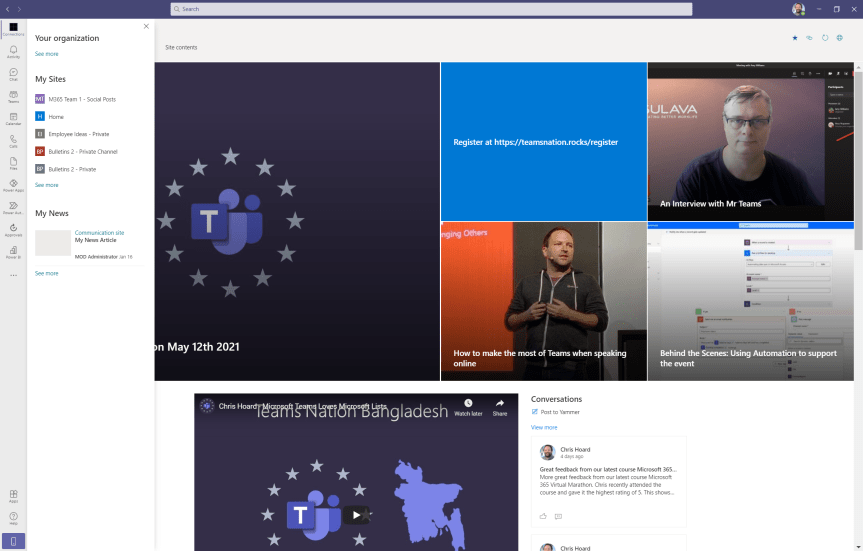
If you haven't already, you'll hear a lot about Viva in the coming months. Viva - from the Latin vivere 'to live' is a set of apps designed to enhance employee experience. In layman's terms, they're made to make your day to day work life better, easier and richer so that you are (in theory) happier, more productive and (in theory) more loyal to the organisation. The idea is that you feel invested in. The organisation thinks about you and how best to support you in your role. Now, there are four apps or 'modules' which constitute Viva with more expected in the future. The first is Viva Topics, an AI powered app which organizes content and expertise into related 'topics' surfaced across existing apps such as Yammer and Microsoft Teams. You want to know what that specific acronym means? Or what that project is all about? Topics will show you a description of that, who is working on it and assets related to it. The idea being that knowledge is to hand without breaking the course of your workflow. You then have Viva Insights, an app which brings together MyAnalytics and Workplace Analytics providing data-driven insights and recommendations to improve productivity and wellbeing. In other words it'll show you things like how much focus time you have and how long you have been working out of hours. It'll show managers how their team members are working together. It's also expected to include Headspace demoed to much fanfare back at Ignite last October. Third, you have Viva Learning, 'a hub for Learning' within Teams aggregating on demand assets from Learn, LinkedIn Learning, third party providers like EDX and a company's own content. This is currently in preview and won't be in GA until later this year. Finally - and what the discussion concerns today, is Viva Connections. Connections is described as being 'the gateway to a modern employee experience' and 'a curated, company-branded experience that brings together relevant news, conversations, and other resources'. It is, more or less, a SharePoint home site surfaced into Teams pinned on the app rail and which will have a mobile experience later in the summer. Unlike the other apps, Connections is completely free and GA making it ideal as the first Viva app for any organisation to get to grips with without having to invest more into licencing - and it is important insofar it fuses SharePoint and Teams even closer together. To many who haven't tried this previously through App Studio, it's exciting stuff.
Teams Real Simple with Pictures: Let’s Do Collaborative Calling
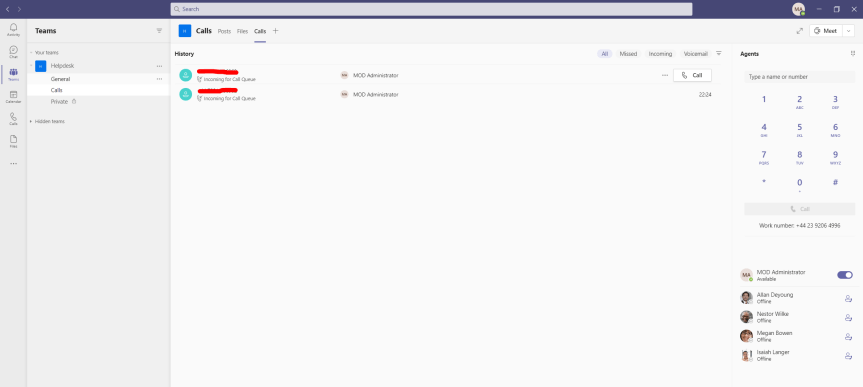
I remember Ignite 2020 well. Uber long days and an obscene amount of awesome content that between speaking and moderating it was an all-you-can-eat buffet both live and on demand. Day 1 was frontloaded with so many big sessions on Teams. After Nadella, it was Spataro. After Spataro, it was Teper. Then after Teper, Herskowitz. Then it was Torok and so on and so forth. After taking a 'break' moderating a 90 minute Learn session with worldwide learning on Teams which washed up about 10pm it was back into the fray. Sec. Power Platform. Yet the way my schedule had panned out I ended that first day watching a double header on Teams calling. The first was with Paul Cannon which was the live session and the second was the advanced calling session on demand. Whilst the second session was valuable simply for the announcement of dynamic CLID's which I'd been getting asked for a lot, it was the first - the one with Cannon which really had the goods. First, Collaborative Calling. Second, a refresh of the Calling UX. Now, the refresh was clever - shifting the dial pad and basing the app around call history because not only was it streamlining a number of unnecessary pages it was rooting calling in calls as opposed to people. But the real gold was collaborative calling. This is the ability to connect a call queue to a teams channel where users can collaborate and share information in the channel while taking calls in the queue. Many admins I knew had wanted it and wanted it bad. For a long long time. Yes, it wasn't comms credits in CSP, nor was it smaller domestic SKU's - I think there will be celebrations when these occur, but oversight of a call queue where every member assigned to that call queue can work together: this is a big gap that Microsoft committed to plugging. I thought personally it was one of the best announcements of Ignite 2020. It's a real quality add and it's awesome that it's finally here.
 @Microsoft365Pro