
![[Archived] Teams Real Simple with Pictures: Getting Hands on with Bulletins](https://microsoft365pro.co.uk/wp-content/uploads/2021/02/image-48.png?w=863&h=0&crop=1)
Happy Valentines Day! It's been a busy few weeks. I am in the middle of this thing called the Microsoft Teams Winter Tour. Basically, it's about ten conferences I am speaking at chained together throughout at the course of January and February. At the time of writing I have done seven. So three more to go - and all three come a week from today on the 19th in a triple header that'll see me speak in France, Italy and Nigeria all on the same day. To be fair its been incredible - but it's also been hard to keep up with all the new stuff coming out in Teams too - and there's been a lot. A lot of news and a lot of developments. So in the period between now and Ignite I am going to try and step back up and I'll start with something which seemed to fly under the radar which is bulletins. This is an app which appeared sometime last week and what interests me particularly about this is that its a Power App, one whose data is stored within Dataverse. Now Power Apps in Teams has massive potential - we all know this, we've all known this a long time. However, previously Power Apps designed by Microsoft typically came as either Teams Templates, or Power Apps Templates which meant you would need to customise and install them yourself as Custom Apps: in other words they weren't already available out of the box from the Teams App store. Is this a new direction? Have Microsoft seen the best way to get into Power Apps is to actually go from the position of using them then customising them? Well, yes. Read the description below - 'it's then easy for an org to go on and extend the core functionality'. Clever Microsoft. Oh I see you. But let's talk about Bulletins. It's an app that's designed to keep Team Members informed in terms of broadcasts and announcements. FAQ's also. Now I can only imagine some within the Yammer community are going to have something to say here - but before we mosey on down to Defcon 1 in regards to apps which dupe functionality, let's have a walkthrough and deploy this and see how we go. Personally, from the description I think this could be good. On the other hand, I also think it could go really bad if people don't understand about storage
Teams Real Simple with Pictures: Retention Policies on Private Channels

Ok quick one as we start the weekend. I had a scenario this week where a customer of a partner asked me 'is it possible to add retention policies to private channels in Teams' - for files in private channels, not standard channels and to do this centrally. The reason for this is that they had third party backup software which doesn't work with private channels currently. Now hands up before investigation and testing I didn't know the answer to this, and it was one of those situations your probably familiar with - considering I do this every day why hadn't I come across this previously? I know. Yet these are good opportunities to learn and to fill in the blank. So, it turns out you can, but the documentation on docs doesn't exactly make this explicit. This blog aims to do so and clarify retention policies on private channels, and in contrast to standard channels
Teams Real Simple with Pictures: Catching up on the the latest YouTube videos with Power Automate, Lists and Teams

It's been a while since I wrote anything about video. I did quite a few blogs on Teams and Stream last year and even did a few sessions on how they worked together on the circuit - but with the transition to modern Stream I'm very much waiting for the new experience; when we start seeing features like the web experience, when podcasts and portals emerge. All in good time - even though in moving the TMR's over I badly need the use of trim, and I still want to talk about video. You see, I watch a lot of it. I love the medium, and so doing a few blogs on power automate and approval scenarios with Lists and Teams, I also had an idea for a new blog involving video. The idea is that I constantly struggle with time. With responsibilities for work, family and community I often miss quality content that goes by on great channels like Microsoft Mechanics. So I thought what if I could put this into a List which updates and I can work through that. Surfacing it in the Team could be quite valuable
Teams Real Simple in Pictures: Disabling List Item Comments in the Web App and in Teams
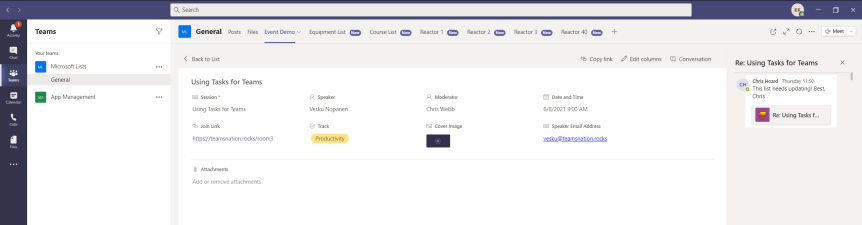
It's been a bit of a mad week. Over the last five days I've spoken at Modern Workplace Conference Paris, the Microsoft Reactor in London and Microsoft 365 California. Awesome events with great organisers and every one a fantastic experience. Honestly, it's such a privilege given our situation, and if you came to see one of my sessions then thank you for your support and the time you've set aside. Now the subject of today is a question I got at the end of the Reactor session which I thought I would follow up on. The session was about Teams and Lists and the question was specifically, can you disable comments in Microsoft Lists? As I said in the session the answer is yes - at least in the web app. So this one is for you. And for anyone else reading why would we disable comments? Well, we may not want to have comments and conversations around List Items. We may find them too busy or too distracting. They may not, in our case, add value. So to start out there is two things you need to know about comments on Lists at the current time. Number one - comments on List Items in the web app are different from conversations on List Items in Teams. As shown below in the screen shots of the same item in the different experiences the comments are different and do not synchronise. Being that you can have two different sets of comments in the same item - that in itself is a reason to want to turn it off to avoid confusion. In addition the data isn't housed in the same place, the conversations in Teams are not housed in SharePoint where the List is. Number two. Disabling comments on List Items in the web app experience can only be done via Powershell and can only be done tenant wide - for all Lists. It's not as granular as being able to do it for specific Lists in specific Sites/Teams, however Microsoft do have future plans to introduce this. So you have to tread carefully here and understand this isn't the complete experience which we want - ideally it would be consistent across Teams and this raises the question? Does disabling it via the Shell for the core web app experience also disable it in Teams? Let's find out
[Archived] Teams Real Simple with Pictures: Forms to the Flow, to the List, to the Team and Yammer using conditions and approvals
![[Archived] Teams Real Simple with Pictures: Forms to the Flow, to the List, to the Team and Yammer using conditions and approvals](https://microsoft365pro.co.uk/wp-content/uploads/2021/01/image-86.png?w=863&h=0&crop=1)
I had a lot of fun writing the last blog on approvals. So I'd thought I would double down and use the Forms app with Flow and Lists which we can surface into Teams and then push out to Yammer by the way of conditions and approvals. I thought it would just be cool to cover a real world scenario which you could apply, customise to your needs to take parts and use them in your own flow. Rather unusually given the length and amount of apps involved I haven't got much to say - I really hope you really enjoy this one
 @Microsoft365Pro