Skip to content

@Microsoft365Pro

Modern Work Blog focusing on Microsoft Teams & Microsoft 365

  • Blog
  • About Microsoft365Pro
  • Speaking Schedule
  • Leading Events

Tag: Teams SPO Metadata

Teams Real Simple with Pictures: Teams Files and adding Metadata Part 2: Managed Metadata

Teams Real Simple with Pictures: Teams Files and adding Metadata Part 2: Managed Metadata

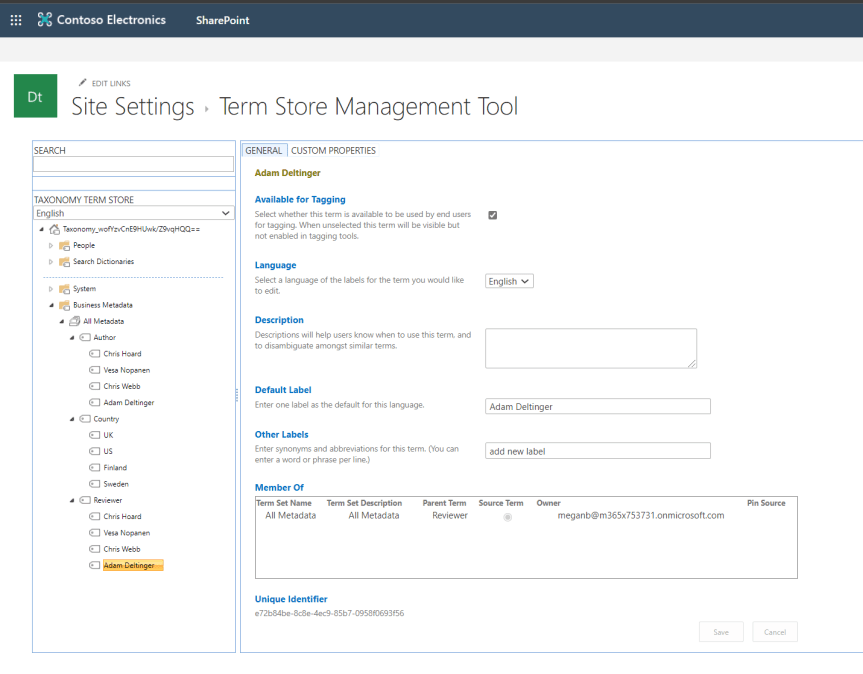
In part 1, we explored adding Metadata to files in Teams through choice columns. This time around, we'll look at adding what is called managed metadata via the Term Store. In SharePoint, the Term Store can be thought of as a collection of term sets, each set containing metadata labels that can be used and applied to files in any SharePoint Site or Site Collection, so any Team or Channel. Therefore, they can be thought of as being managed centrally or 'managed metadata' unlike choice columns which are created on a site by site basis by members of the Team. This saves significant time for Team Owners and members who want to use the same metadata labels across Teams. Like choice columns, Managed Metadata is configured within SharePoint as opposed to Teams itself

Posted on 17th Feb 202017th Feb 2020 by microsoft365proPosted in Microsoft SharePoint, Microsoft TeamsTagged Managed Metadata, Microsoft Teams Metadata, MS Teams Files Metadata, MS Teams Metadata, Teams Files Metadata, Teams Files Order, Teams Files sort, Teams Managed Metadata, Teams Metadata, Teams SharePoint Files, Teams SharePoint Metadata, Teams SPO Metadata.

Enter your email address to follow this blog and receive notifications of new posts by email.

Social

  • LinkedIn
  • YouTube

Categories

  • Archive 2019 (2)
  • Archive 2021 (5)
  • Archive 2022 (7)
  • Archive 2023 (4)
  • FightCorona (30)
  • Microsoft 365 (28)
  • Microsoft Azure (3)
  • Microsoft Community (35)
  • Microsoft Defender (4)
  • Microsoft Dynamics 365 (1)
  • Microsoft Edge (3)
  • Microsoft Entra (16)
  • Microsoft Exchange (5)
  • Microsoft Forms (7)
  • Microsoft Learn (14)
  • Microsoft Lists (19)
  • Microsoft Mesh (3)
  • Microsoft OneDrive (11)
  • Microsoft OneNote (3)
  • Microsoft Power Apps (9)
  • Microsoft Power Automate (20)
  • Microsoft Power BI (5)
  • Microsoft Power Pages (1)
  • Microsoft Power Platform (11)
  • Microsoft Security and Compliance (18)
  • Microsoft SharePoint (39)
  • Microsoft Stream (19)
  • Microsoft Teams (245)
  • Microsoft Tech Community (4)
  • Microsoft Viva (9)
  • Question Time (5)

Search

Feed

My Tweets
Blog at WordPress.com.
  • Subscribe Subscribed
    @Microsoft365Pro
    Join 595 other subscribers.

    Have a WordPress.com account? Log in now.

  • @Microsoft365Pro
    View site in Reader
    Manage subscriptionsSign upLog in
    Report this content
    Collapse this bar
Loading Comments...