

Every Sunday I typically write a blog. Now in order to write that blog I typically use a test tenant set up on the CDX platform at https://demos.microsoft.com. Why? It's what we call a Ring 4 tenant which means that everything within it - all of the functionality in Teams has been released and is generally available. Since my corp tenant is TAP (Ring 3) I can't just take pictures of it or use it in blogs as I may accidently infringe on NDA and the things I am working on with the team at Microsoft. So reviewing the Ring 4 tenant this morning in order to find something to write on, and logging onto the web app via Edge (https://teams.microsoft.com) I was blocked from accessing it which said I needed to allow third party cookies. Ok. Now, this article will focus on a fix for it - not the semantics of whether third party cookies ought to be a prerequisite of the web app experience. Some articles argue that third party cookies need to be on for the browsing experience to be optimal. Others state that third party cookies are a security and privacy risk given they harvest behavioural data. Wherever you fall on this spectrum the fact remains that Teams needs to allow it. I am sure Microsoft will provide an official reason for this in time
Author: microsoft365pro
9 Teams Sessions to watch out for at Microsoft Inspire 2020

I have many fond memories of Microsoft Inspire. Having attended Inspire the last two years its something I recommend to anyone should they have the opportunity and resources to do so. Yes, it's in Vegas, and yes it's super long days, next-to-no sleep and probably 20,000 plus steps a day. But you have to be there to experience it. It's a truly immersive experience beyond anything I thought it would be. And when I think of Inspire today, I don't particularly think of things like particular sessions, or even the speakers. I think of things like grabbing a bagel in the Tropicana on the way over the T, the route I usually took to get to the ballrooms through the Mandalay after getting off the monorail past the Luxor, or waiting in line for a cab at the Delano getting ready for a meeting at somewhere like the Aria. For me, Inspire is all about direction and logistics, evaluating how far we have come, understanding where we are all headed and how prepared we are to do so in that regard
Teams Real Simple with Pictures: Sending Pulse Surveys to the Team using Forms

What is a pulse survey? Whilst there are several definitions, a pulse survey measures the employee experience and is named after the idea of checking the “pulse” of something like employee satisfaction at a specific moment in time. They allow companies to measure and compare feedback continually and analyse the effect of initiatives and are typically run week to week as opposed to annually. The benefits of taking regular pulse surveys include on the spot insights, higher response rates due to being both shorter and targeted and greater employee satisfaction. The fact that Microsoft Forms has now added pulse survey templates means that pulse surveys can be easily created, and used with your Team. This is a nice add leveraging existing functionality across Microsoft 365 applications. You can gage the mood in the team on a regular basis, you can get regular feedback, and you can use this feature to foster a more inclusive team
Best of luck with your renewals MVP’s

For those of you who didn't know, it's the annual MVP renewal this Wednesday. July 1st is when all MVP's go through their annual renewal and learn whether they will remain in the program for another year. Many will make it. Some, sadly, will not. Some will have chosen throughout the last 12 months to pursue a different path whilst others may no longer have the time or opportunity to commit to it
Teams Real Simple with Pictures: Accessing all of your Teams files through a single channel
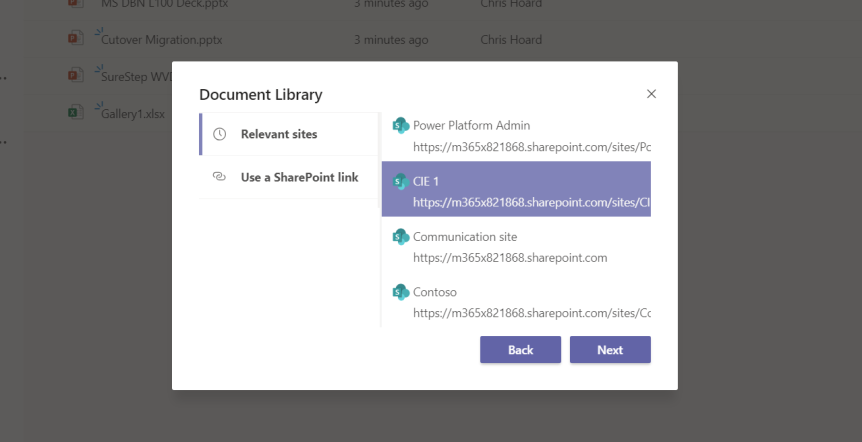
If you are like me, then you are always looking at ways to do things quicker or make things easier - and working with files in Teams is no exception. Now, as a rule of thumb and being a minimalist at heart I only ever keep a maximum of three Teams visible at any one time, but one of the drawbacks of this approach is that I often get asked to upload, amend or co-author content in Teams, or channels of Teams which I have hidden or rarely use, and since I am a member of over four dozen Teams it takes me an unnecessary amount time to locate it and do the upload or the amendment. Now, I don't know when exactly this functionality dropped into GA - I can't remember seeing it on the Microsoft 365 roadmap or the Message centre, but you can now attach cloud storage to channels. This means that you can add all of the SharePoint file structure of every Team you are a part of to a single channel which can short circuit much of the previous effort involved. This includes Private Channels
 @Microsoft365Pro