
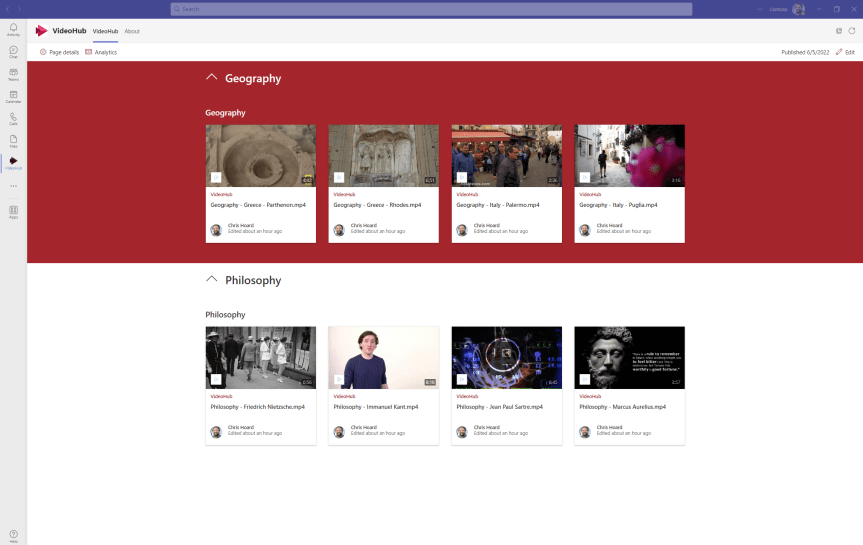
Ok. So unlike yesterday I have a few hours at my disposal and I wanted to test seeing whether I could build a Stream video portal in Teams. These videos should be surfaceable - but not as a tab in some team which I am a part of. These would be ideally surfaced as a personal tab in the app rail where I can access my videos at any point in time right in the flow of my work. Now the reason I want this is because I am a trainer, and as a trainer I have assets for courses which I want to serve up using the Shared System Audio feature in Teams. With the arrival of chapters and transcript, I will hopefully create this great situation for myself where I can have videos for my courses, and then chop those videos up into chapters to easy access to show what I need. So yeah, whilst this could have good application within my own organisation I am actually doing this one for my own personal gain. The cool thing about this is that in using SharePoint as the base for the video portal, we could enrich that video portal with files and loads of other stuff. But here I am going to aim at a version 1.
Category: Microsoft Stream
Direct the App Tile Launcher to the new Stream on SharePoint web app experience in office.com – Via GUI or PowerShell
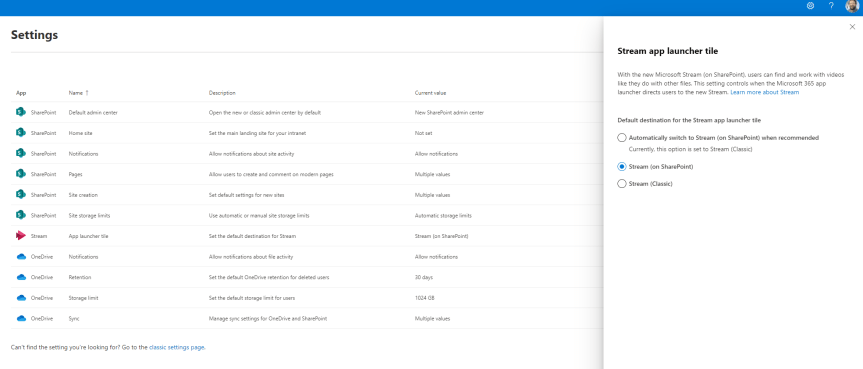
Hope your enjoying the Jubilee bank holiday this weekend! After taking my five year old to a two hour - yes you read that right - two hour pantomime today let's just say I'm 99% there on the old cognitive load. I'll be giving the BBC coverage of Party at the Palace a miss. I'll be giving TV a miss. In fact, I'll be enjoying silence in the most myriad and profound kind of ways. So in order to unpack I'd thought I do a quick blog. A virtual commute as you will. Into nothingness. In 45 minutes I am going to discuss how an org can direct to the new Stream on SharePoint experience for their users in office.com - which I see has now dropped into Ring 4 in a test tenant. It was only a few weeks ago - maybe a month - where I discussed the new Video Chapters. A few months prior to that I discussed how it was possible to use the URL steam.office.com to get to the new web app experience. The point is with the introduction of the web app and the player I feel we are moving towards a tipping point in the transition from classic to Stream on SharePoint. I feel we are starting to get to the good stuff. So what is this blog in particular addressing? Well Stream in the App Tile Launcher - what you and I know as the Waffle - in office.com continues to direct to classic (https://web.microsoftstream.com) whereas you can now set it in the SharePoint Admin Centre to direct to Stream on SharePoint (https://stream.office.com). As much as users knowing the URL it's never going to be as memorable as just redirecting via the App launcher. So let's take a quick look, as there isn't much to do - rather you just need to know where to switch it. Later on, I am sure it'll become the default
Teams Real Simple with Pictures: Stream Video Chapters and getting them into Teams

Stream, or should I now say Stream on SharePoint? The last time I wrote on it was about the web app at stream.office.com which has now been available for some time. Since then, Mark Mroz and the team have been working on migration tools. They have also been working on the player and a ton of other things. Now, going back to that old marketing pitch, the point of Stream v2.0 was all about Stream becoming the video player for the whole Microsoft 365 ecosystem, as opposed to an app with it's own dedicated storage. I don't mind admitting I'm still kinda gutted about this because genuinely I thought the former experience was really really good whilst I also really felt for the team given they had to ice it and pivot to which I can only imagine the amount of pain involved. But I am endeavoring to be onboard with the new, and so when using Stream in my demo tenant a few days ago I saw that chapters had dropped. Chapters, which break up a video into sections and let you easily rewatch different parts, is one of the functionalities that the old version didn't have and the kind of functionality which feels good. It's part of a nice incremental development cadence which seems really well planned, so kudos again to the team
Teams Real Simple with Pictures: Using Generic Links in Approvals for SPO Docs, Sites, Videos and Lists
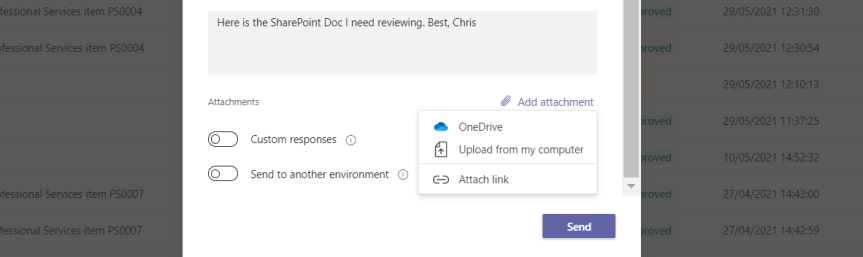
The TV is on. The Euro 2020 finals between England and Italy has just kicked off. But Sunday nights are blog nights: and so trying to get the best of both worlds I will be writing a short blog about a granular but useful addition to functionality which came along for the approvals app this week. This is the ability to use generic links. Up until this point, we've had the ability to upload documents from a local machine; we've had the ability to add a document from OneDrive. But nothing regarding SharePoint; nothing about something other than a document. Now, we know that support for SharePoint - here meaning a dedicated option within the approvals app along with a site and file picker, is on its way. This is within the item on the Microsoft 365 roadmap - RID 70787. However, being able to use a generic link we don't have to wait for that. Indeed, generic links are really flexible insofar that we can start to review and approve anything which has a URL. This opens up some interesting scenarios
The new Stream Web App is here. I found it! And it supports Teams Meeting Recordings
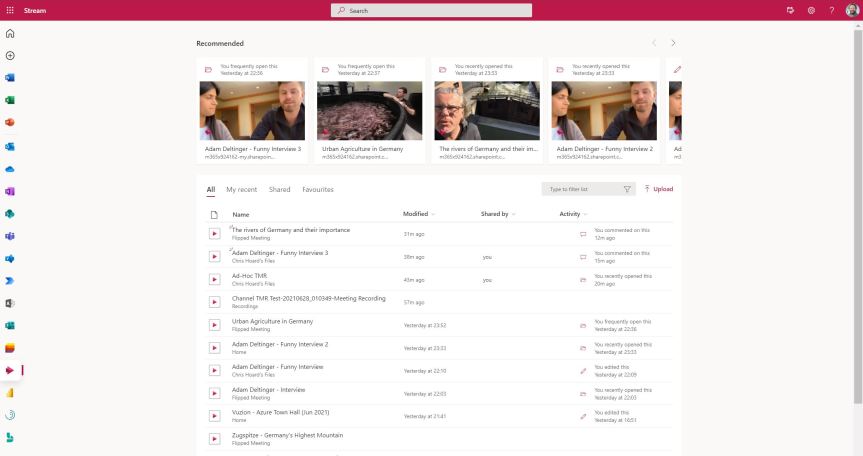
given that I pretty much liked everything about Stream: the web experience, the mobile experience. Both were easy to use and did what it said on the tin. It had started to have great features like trim and screen capture. It could be brought into Teams in a number of ways - and kudos has to go to the Stream Team for how hard they must of worked on it; creating a strong app which was really taking off and really focused bringing out the best in video. However, on the other hand whilst recognising all of this; pivoting made a lot of sense. There was a growing amount of noise and frustration from the tech community about not being able to share video externally, about not being able to apply common compliance functionality such as retention. Since Stream had it's own completely separate storage many things had to be developed separately. Whilst I know there was plans to do this - ones which were very near to completion since I was involved in roundtables previewing the functionality; in a world where apps like Microsoft Lists were being designed to work right across the stack leveraging existing storage on SharePoint and OneDrive and existing security and compliance functionality; Stream felt outside of that almost moving in the opposite direction. So 'bringing it into the Microsoft 365 stack', the idea that a video 'is a file just like any other file' won out. And what did that mean? Stream 2.0 would pivot to become the player across the Microsoft 365 stack. SharePoint and OneDrive would house video files. There would be a new personal web app, a new player and video 'portals' which could be created on SharePoint. Now, in the time between Ignite 2020 and now much has focused on things such as recordings, changing the default location to SharePoint and OneDrive and CDN support. We know that the new player is coming soon due to it hitting the message centre. However not much has come out officially about the web portal and when we can start using it. Tonight, out of sheer curiosity I had a go at amending an URL since this worked previously for Lists via OneDrive. The new Stream portal is already there. This wasn't in a TAP or preview ring. This was in a Ring 4 GA tenant. Let's see what we can do
 @Microsoft365Pro