
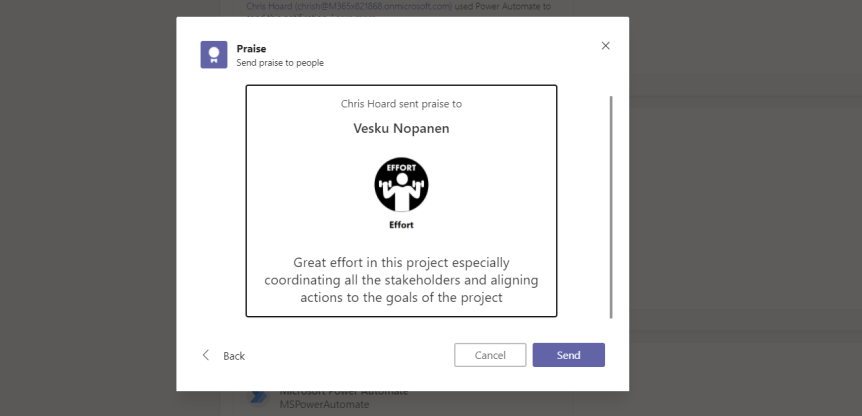
Before I worked in IT, and before I was a Teacher I - like many people, did a few jobs to make ends meet. I had graduated from university, I had worked in Africa for a time, but coming back home the UK job market wasn't particularly great at the time. I had few transferable skills and I was still young - around 22 or 23 at the time. So I spent a year or so grinding it out doing kitchen work in a well known pub chain to buy myself a few months to think about what I would do in the future. It was long evenings. No windows. Emptying deep fat fryer oil and scrubbing gantries and hoofing freezer boxes up into walk in fridges. Now one of my memories from that period was that I was finishing up a shift and I vividly remember walking into the staff room to see a colleague of mine reading How to Make Friends and Influence People. This book, by Dale Carnegie, was published back in 1936 and sold over 30 million copies worldwide. If you didn't know it's one of the most successful books in American history. So I decided to give it a go. So how do we make friends and influence people? One of it's principles is 'begin with praise and honest appreciation'. Another is 'Praise every improvement'. Carnegie himself said 'Praise is like sunlight to the warm human spirit; we cannot flower and grow without it'. The ancient philosopher Xenophon, the great military leader at the head of the ten thousand greek mercenaries and the anabasis out of Persia said that 'the sweetest of all sounds is praise'
Category: Microsoft Teams
Teams Real Simple with Pictures: New Calendar View in Lists Web App + Teams

One of the things I enjoy most about what I do is the maturation of the technology which I use. And so it was with great pleasure that I was playing about in Teams this week in a Ring 4 test tenant getting ready for AMS Germany when I saw that calendar view for Lists has dropped. I didn't see any announcements. Maybe it'll be on the SharePoint Pitstop next week. But why I was excited was because when Lists was first announced back at Build earlier in the year, it was confirmed it would have List, Gallery, Grid and Calendar views. Gallery was added a month or two back - it was after Lists was introduced into Teams and now we have Calendar to complete the set. You see, I have become a big advocate of Lists over the last four or five months. I have spoken about it a lot on the circuit. This is because I think it is very central to what Microsoft is doing to revitalise SharePoint and is the application which best defines Teams as a Platform (TaaP). But getting back on point, calendar view is a nice add. Use it for events. Use it for meetings. Use it for birthdays, or deadlines, or schedules. This opens up a whole new raft of use cases for how Lists can be used - both in the web app and in Teams. It can apply both to personal and team Lists
Teams Real Simple with Pictures: Block Call Me within Teams Meetings

Ok, so this one came about after someone on Tech Community asked me if there was a way to remove the call me functionality within Microsoft Teams Meetings. Most people I talk to about it typically don't know about it or use it, and even less on the reasons as to why to turn it off in the first instance. So lets do this. As defined by docs.com, the call me feature gives users a way to join the audio portion of a meeting by a landline or mobile. Why? Think of a scenario such as needing to get up and walk around whilst the meeting is in progress or simply because the user considers audio in that location to be better over the PSTN. They may just like the tangible feel of a device. All legitimate reasons. However, in making the Meeting call the user on a landline or mobile begins using the audio conferencing minutes pool - 60 minutes per user per month and then start using communication credits if they have burned through the pool allowance, so if the admin doesn't know this then it could end up both rinsing their pools and credits causing them a significantly higher bill than they were anticipating - particularly if several users started to do it regularly. Therefore, the admin at least needs to know how to block and mitigate that behaviour by making users call into the meeting or stick to using VOIP audio where they could work with them to resolve any quality issues, or potentially invest in an IP phone
Teams Real Simple with Pictures: Get Ready for Teams Public Preview
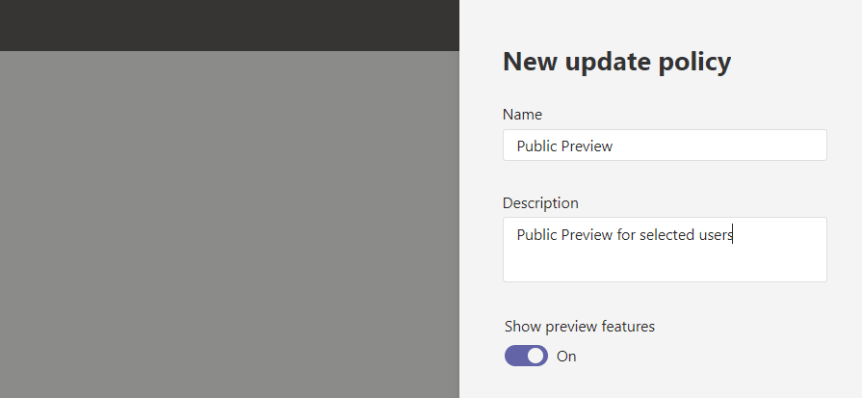
Preview features. When I was starting out in my IT career - in what is now rapidly becoming a long time ago - I wanted all the access and all the features you could imagine. Now, I am not going to lie to you this was all largely driven from a need to know first. I wanted to know first and wanted to get stuck in in order to a.) make my life easier and b.) get ahead of the curve to show customers that I knew what I was talking about. Whilst this isn't quite the case anymore since I believe in security principles such as RBAC, that things are more polished when they hit GA, and having been a frequent flyer to the wild west without an SLA, I still can't quite resist the lure of something new. So its been with interest that I have monitored the development of the new public preview feature for Microsoft Teams which has now surfaced in the Teams Admin Centre prior to work beginning on the Teams client to consume it. So here's the million dollar question - why has Microsoft introduced a public preview specifically for Teams when you could already set targeted release in the Microsoft 365 Admin Centre?
Teams Real Simple with Pictures: Using List Controls to disable personal lists and List Templates
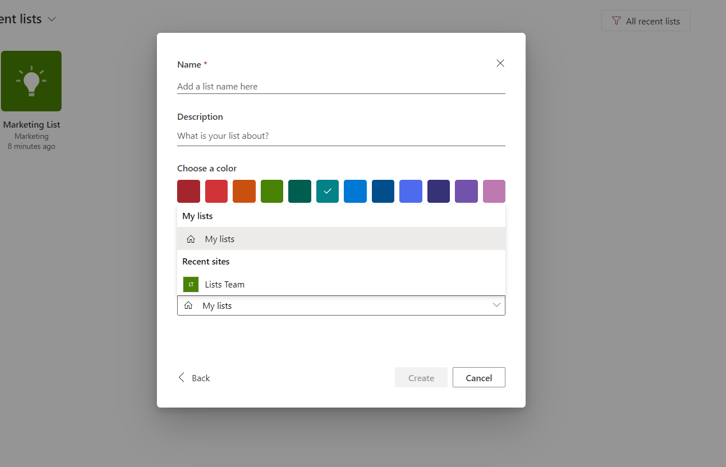
A quick one today. I was looking over the SharePoint Roadmap pitstop for October and saw that there are now two List controls available: these are the ability to disable personal lists and the ability to disable List templates. Since I am giving talks on Lists next week at no less than three events either side of the Atlantic then I thought it would be good to cover this and get ahead of the curve. The first is the ability to disable personal lists. Personal lists are your own lists, they are stored in OneDrive and when creating a List you would select 'My Lists' from the dropdown within the Web App. They are not available in Teams since Lists in Teams are a different type of Lists called Teams Lists. These are housed in SharePoint and are meant to be shared with other members of the Team. The ability to disable personal Lists can simplify, or hone, the purpose of Lists insofar that by disabling personal, you are keeping them within SharePoint, within a Team context and away from individuals. Imagine that a really important List was located in someone's OneDrive and then that user left the organisation? Secondly, moving onto the ability to disable List templates this one makes complete sense: whilst they could be found helpful, they could also be - depending the organisations perspective - a hinderance since people could be confused by them. Imagine it from an end users perspective: Are these the Lists meant to be used? Did my organisation create these templates? Administrators may wish to turn them off which could, in a sense, make it easier for those who are creating Lists to simply start from scratch, import or clone. A nice pair of adds. I look forward to more in the future!

