
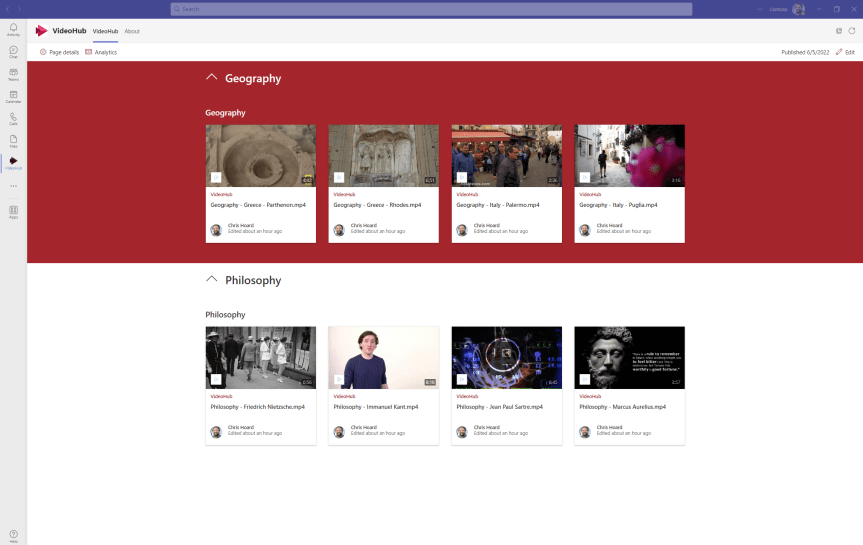
Ok. So unlike yesterday I have a few hours at my disposal and I wanted to test seeing whether I could build a Stream video portal in Teams. These videos should be surfaceable - but not as a tab in some team which I am a part of. These would be ideally surfaced as a personal tab in the app rail where I can access my videos at any point in time right in the flow of my work. Now the reason I want this is because I am a trainer, and as a trainer I have assets for courses which I want to serve up using the Shared System Audio feature in Teams. With the arrival of chapters and transcript, I will hopefully create this great situation for myself where I can have videos for my courses, and then chop those videos up into chapters to easy access to show what I need. So yeah, whilst this could have good application within my own organisation I am actually doing this one for my own personal gain. The cool thing about this is that in using SharePoint as the base for the video portal, we could enrich that video portal with files and loads of other stuff. But here I am going to aim at a version 1.
Direct the App Tile Launcher to the new Stream on SharePoint web app experience in office.com – Via GUI or PowerShell
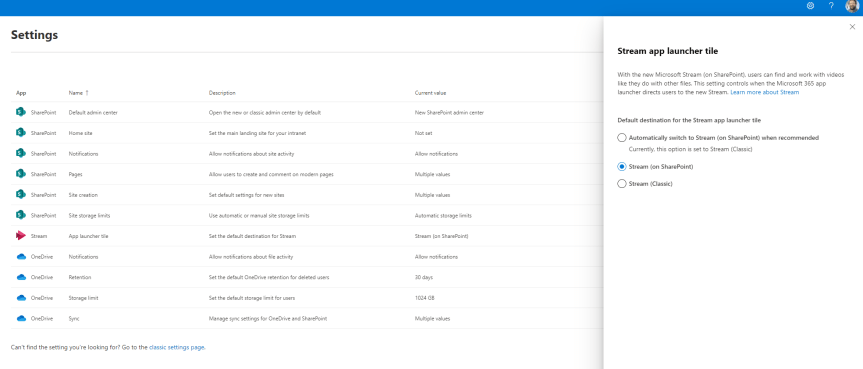
Hope your enjoying the Jubilee bank holiday this weekend! After taking my five year old to a two hour - yes you read that right - two hour pantomime today let's just say I'm 99% there on the old cognitive load. I'll be giving the BBC coverage of Party at the Palace a miss. I'll be giving TV a miss. In fact, I'll be enjoying silence in the most myriad and profound kind of ways. So in order to unpack I'd thought I do a quick blog. A virtual commute as you will. Into nothingness. In 45 minutes I am going to discuss how an org can direct to the new Stream on SharePoint experience for their users in office.com - which I see has now dropped into Ring 4 in a test tenant. It was only a few weeks ago - maybe a month - where I discussed the new Video Chapters. A few months prior to that I discussed how it was possible to use the URL steam.office.com to get to the new web app experience. The point is with the introduction of the web app and the player I feel we are moving towards a tipping point in the transition from classic to Stream on SharePoint. I feel we are starting to get to the good stuff. So what is this blog in particular addressing? Well Stream in the App Tile Launcher - what you and I know as the Waffle - in office.com continues to direct to classic (https://web.microsoftstream.com) whereas you can now set it in the SharePoint Admin Centre to direct to Stream on SharePoint (https://stream.office.com). As much as users knowing the URL it's never going to be as memorable as just redirecting via the App launcher. So let's take a quick look, as there isn't much to do - rather you just need to know where to switch it. Later on, I am sure it'll become the default
[Archived] Teams Real Simple with Pictures: Setting up a Multi-Stage Access Review for Inactive Users in a Team
![[Archived] Teams Real Simple with Pictures: Setting up a Multi-Stage Access Review for Inactive Users in a Team](https://microsoft365pro.co.uk/wp-content/uploads/2022/05/image-170.png?w=863&h=0&crop=1)
So Build is in the books. And it was awesome. And I got to catch up with friends such as Vesa Nopanen, Chirag Patel, Sharon Sumner, Al Eardley, Kevin McDonnell, Chris Huntingford and Claire Smyth. I got to speak a bit on Metaverse and delivering next-gen experiences at scale at Microsoft 365. I got to start an Anti-Sticker and Pro-Golf (the car) movement with Garry Trinder. And then there was great food - and I am going to call out the wall full of doughnuts up on the first floor where I was speaking in particular. But all good things must come to an end. And by end I mean an opportunity to do other good things such as getting back to the blog. Now, I was torn between doing something quick and dirty this week, and doing something a bit more intricate. This is because Stranger Things Season 4 came out a few days ago. But however interesting the Mind-Flayer is, the Demogorgon - whoever they got this time running around going off their nut in Hawkins, Azure AD has a few new pieces currently in Preview regarding the old Identity Governance. So this is going to show off both multi-stage access reviews, as well as the ability to now remove Azure AD inactive users within the context of Teams. This will be another tool in the toolkit for dealing with Stale Users and Stale Guests: all of which could be used to get through to your users or your data.
Teams Real Simple with Pictures: Voicemail and Redirecting using SIP-URI
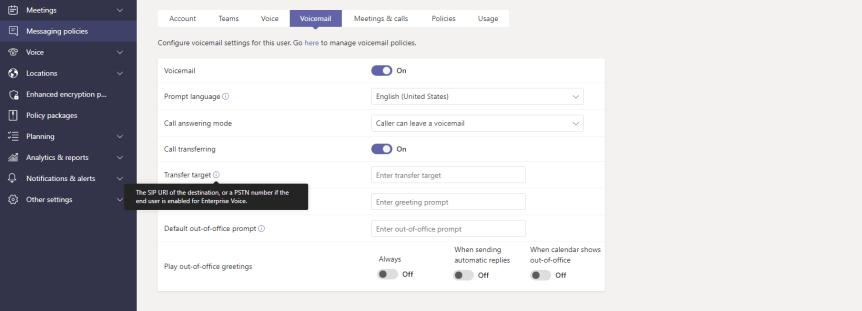
From time to time, I receive the odd question about Microsoft 365 - and whilst it has been by admission difficult this year getting onto the Tech Community I am starting to make a general comeback into wider community pursuits outside of speaking and blogging. Now everyone pretty much knows I started out in the Tech Community. I like answering questions. They are always opportunities to help, learn or both. So I had a question this week regarding the new centralized voicemail settings in the TAC and this particular question referred to call answering rules. More specifically, what did it mean that you could forward a call which has gone to voicemail to the SIP URI of another user? Where could you find the SIP URI of a user? What is the SIP URI? Very good.
Microsoft Build 2022: My Sessions, Teams and Everything Else I’d Recommend

A year ago feels like a long time. It also feels like an incredibly short time. 2021 was the first year I spoke at Microsoft Build and having spoken at Ignite three times previously getting to another one of the big four felt like such an achievement. Of course it turned out to be as great as you would expect. I participated in several sessions. I did a blog. Knowing me I probably also got involved in a few AMA's at the time. Yet when these things come around annually it feels a bit like a birthday. You reflect. You look at how far you've come. At least I do. And what I have found in the last few days is that whilst much has remained the same: as in me being flat out; Vesku being the biggest Metaverse fan I know; and Deltinger still speaking about channels in some form out on the circuit, much has also changed. Firstly, Build is hybrid this year. That's right. Whilst much of the content will be digital and consumable online there will be regional spotlights which are in-person events held at the Microsoft HQ's in those countries. So this is not just a return to Build. This will be the first in-person event I have spoken at since Commsverse - and I don't mean the one at Mercedes Benz world I am talking about the original event which was held at the Microsoft Store in Oxford Circus about a month before we all went into lockdown. Secondly, it's been quite a year in terms of my personal life. I was hospitalized with Covid. I narrowly avoided burnout and one of my best friends and biggest supporters - my dad - recently passed away from Idiopathic Pulmonary Fibrosis (IPF). So I very much feel like I am coming into this one older. More weathered. Finally, Teams Nation came to an end this year. Vesku and I felt like we had taken it through to its logical conclusion and wanted to go out on a high. I guess aggregating all these things together - plus the fact that we are living in such interesting times means that I am looking forward to Build more than I did last year. Much more. You know, I just want to go there stay up in Reading for a few days and just have fun with people who genuinely want to make the world better. Now whether you are joining it virtually, or have the opportunity to attend in person I could go on about Build being the bellwether and all that. I could reiterate what I said in the blog last year. But really? Come and have fun. Let's get behind the makers. My father had such a passion for carpentry that he used to say that when he retired he would do it full time. And he did. And you know what? It brought him so much joy. I love you dad.
 @Microsoft365Pro