
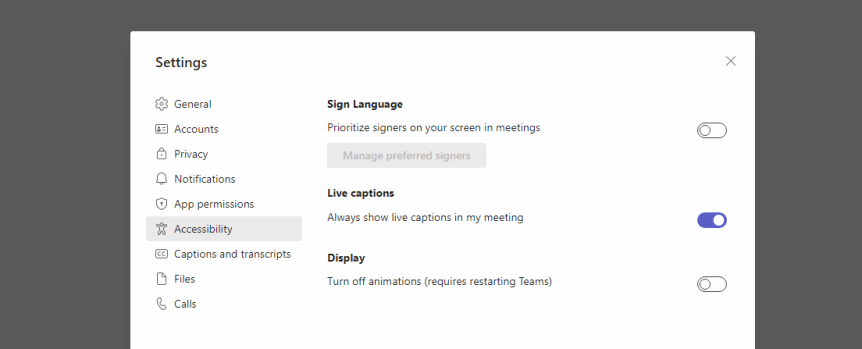
So recently I had the opportunity to meet up at South Coast Summit with Dona Sarkar. Dona is the Director of Tech at Microsoft Accessibility - but I have known her since back in the day when she headed up the Windows Insiders program. Now, it is true to say that me and Dona have a fair-few-things in common. Travel. Geography. Africa. Keeping things interesting. Side Hustle. Avoiding Jail. Good Food and going all in on whatever it is we are doing at the time. So, it was a real privilege that she came to our session on Metaverse for Business. And in true Dona style I ended up dropping in a load of ad-hoc accessibility scenarios into the content on the fly about two minutes prior to speaking. But that's the point right. We must, as Nietzsche once said, live dangerously! And whilst we never got the opportunity to have a real catch up - given she's always in such demand at these events I know we'll do loads more together in the future. And so, as a thank you for coming to our session I wanted to make everyone aware of the new ability in Teams for users to turn live captions on for every one of their meetings. Why? Because it's easy and it's important given that Live Captions can help significantly with users hard of hearing, where the primary language of the meeting isn't the users first language and where meetings are conducted in noisy environments, but from asking around my own organisation many people don't use them because they have to turn them on every meeting. They forget. Or they can't be bothered. It's one more action. Remove these barriers and -- whilst it's a personal view - I think that it will be used by most people in an organisation to the point that captions will be normalized and the standard for Teams Meetings. And do you know what? My wife has actually gotten me in the habit over the last few years of watching TV at home with the captions on by default. Given my age, and the number of alt-rock concerts I used to attend when I was young in the 90's, captions have really helped me too
Tag: Microsoft Teams Live Captions
Teams: #FightCorona – In The Meeting: Hard to hear? Use Live Captions
Sometimes, we can't always hear whose speaking in the meeting because it is noisy where we are. We may be in a busy office, near a construction site or in a cafe. Live captions is a great way to circumvent this issue. It gives participants a way to follow along with the conversation, whilst also being includisve of participants with different hearing abilities or language proficiencies.
 @Microsoft365Pro