

This week I have been on annual leave - and although you would have thought it would have been challenging given Covid and the UK going back into lockdown measures, it's actually been a good one. First and foremost I have have had a significant amount of time to spend with my family and get a lot of personal projects done. Secondly, I have had some time on the side to build a Microsoft Teams Calling course which I am starting to teach at the beginning of November. Now, being a one day course it can't possibly cover everything there is to know about calling in Microsoft Teams, but it does go into the fundamentals including planning for calling, phone system functionality, direct routing and day to day management. Now, seeing as I have been writing all week on calling, I thought I would leverage this for a quick win on the blog, and so this week I have chosen to write on how easy it is to set up a call queue in the Teams Admin Centre. Call queues are a really nice feature for managing org wide call distribution. Think of them like being a waiting room in a Doctors surgery, or the deli counter at a supermarket. When callers need to reach someone with a particular specialty - such as sales or service - rather than a specific person, you can use call queues to connect callers to the group of agents who can assist them. Callers are put on hold until an agent assigned to the queue is available to take their call
Author: microsoft365pro
Teams Real Simple with Pictures: Opting into SharePoint/OneDrive for Business as the location for Teams Meeting Recordings

Stream is changing. If you kept up to date with Ignite then you will know that it's being re-imagined and rebuilt to integrate seamlessly with applications across the stack. One of the consequences of this change is that Teams Meeting Recordings (TMR) will - like all video - be stored within SharePoint (in the case of channel meetings) and OneDrive (in the case of non-channel or what we call private meetings). There is a lot of sense and upside to this. For example, video will now be able to be shared externally which was the Achilles heel with classic stream and which many users ended up doing anyway albeit moving the video manually. Secondly, we can now leverage Microsoft 365's security and compliance functionality such as retention
Thanks for all your support in my first year as an MVP!

It's October 2nd! I've now been an MVP for a year! And looking back over the last twelve months I wanted to take the time to call out a number of individuals who have helped along the way
Teams Real Simple with Pictures: Group Policy Assignment
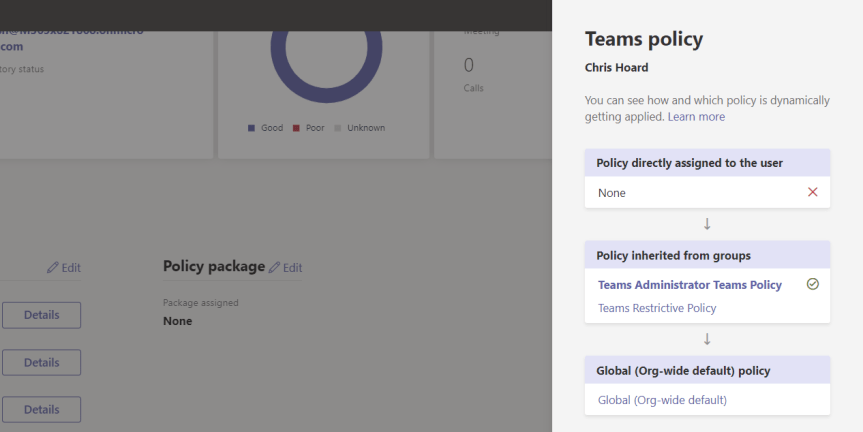
Ignite is over! It went by so damn fast! And getting to the end of the week it was - admittedly - really tempting to do a blog regarding all of the new functionality which is incoming into Microsoft Teams. However, since there are loads of these blogs at the moment, and since I'll be covering them as they come into play anyway, I thought I would focus in on a nice add which I saw has surfaced recently in the TAC called Group Policy Assignment. Group Policy Assignment allows you to manage Teams policies at scale, applying them to many users based upon membership of a group. This could be the underlying Microsoft 365 group of a Team, this could be a security group, it could even be a distribution group. Now, when you consider it could be any kind of group then this becomes quite powerful. You could, for example, use policies alongside dynamic group membership. Or you could apply policies for specific roles or hierarchies. And the beauty of all this is that you no longer have to do it all by assigning policies directly to specific users. Simply by adding a user, for example, to a specific security group they can have all their policies assigned in one go. By using Powershell, you could add hundreds of users to the same security group and all of their policies - from messaging to meetings - would be assigned and ready to go in a matter of minutes
Microsoft Ignite 2020: My Sessions, 10 for Teams and Everything Else I’d Recommend

It seems bizarre that Ignite 2019 was only ten months ago. So much has happened. The world has changed. And yet - it seems like only yesterday I was getting on that bus heading down to the OCCC to speak for the first time. Now, all things considered what struck me the most - the insight if you will - was that Ignite is more about people than about tech. What? Ignite? The biggest Microsoft tech conference of the year? Yes. You see the thing is, past the tech each and every one of us are all in this together. We love technology. We love, as technologists, figuring things out and seeing things work. We love delivering and bringing to life technology which will make businesses more secure and more productive whilst making the lives of our colleagues and friends, and users a little easier. And whilst Ignite 2020 won't be in person - a shame because I loved the thought of meeting up with everyone in the French Quarter of New Orleans for some gumbo, it'll be just as personal. This event is for you. You are part of a community of millions coming together from every country and continent on the planet
 @Microsoft365Pro