
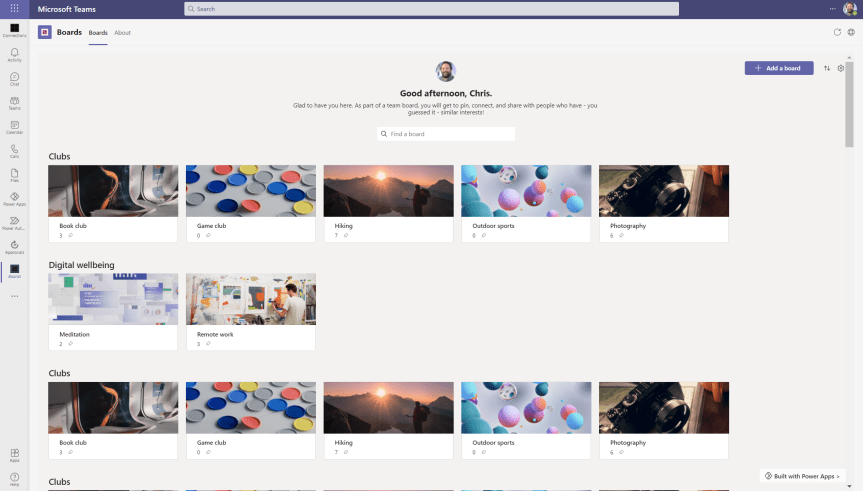
Day two of Build. It's a good one. And I have the opportunity of following up yesterday's blog on Perspectives with one on Boards. This is the second of three blogs on the three new Power Apps Solutions introduced at Build, and which I think are really building (excuse the pun) on the success of others released over the past six months. I am talking about Bulletins, Milestones, Employee Ideas, Inspection and Issue Reporting. If you haven't used them yet, they are Power Apps within the Teams App store which you can install and which are deployed in Dataverse for Teams. The great thing about these apps is that you can go on and extend their functionality, you can widen their use in broad distribution scenarios, but what is also really cool is that they are straightforward and you can simply use them straight out of the box. They are designed for a specific purpose. So let's get to it for today
Category: Microsoft Power Platform
Teams Real Simple with Pictures: Getting Hands on with Perspectives
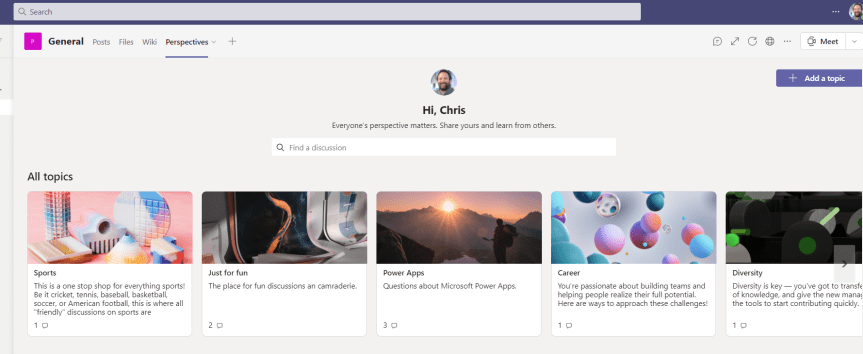
Today at Microsoft Build it was great to run a Table Talk with Vesku Nopanen, Reza Dorrani, Mar Llambi, Karoliina Kettukari and April Dunnum. Lots of people showed up. I think - and I say think - we answered most questions. The chat was moving so fast that Reza, Mar and I were leapfrogging each other trying to answer them in time. There's a lot of interest about Dataverse for Microsoft Teams - particularly the apps which can be installed in them and extended with by Fusion Teams - Teams which are mixes of citizen and professional developers. Now some of these apps you may already know and used, and some of them I have already written about: Bulletins and Employee Ideas. There's Milestones too and a few others. Today, at Microsoft Build, three more were announced. Profile Plus, Perspectives and Boards. Over the next few days I am going to write about all three and all three are available in preview. Today I am going to cover Perspectives.
Teams Real Simple with Pictures: Using Data Loss Prevention (DLP) to stop data leakage from Dataverse for Teams Apps such as Bulletins or Employee Ideas

Last month, I wrote a bit about the new Power Apps Templates in Teams - Bulletins and Employee Ideas. I really liked them. They are really useful for bringing in new functionality for Teams and filling some gaps, they can be used by both users inside the Team where they are deployed or outside of the Teams via the broad distribution functionality. They can be extended by developers looking to build on the functionality which already exists. However, in thinking about how these apps can be extended we must also put our security and compliance hats on and think about how the ability to extend them can be controlled - particularly in terms of connectors and data leakage. You see, when we start using these apps we will begin adding data - company data. In the case of bulletins we add things like company news, URL's and even contact details. In the case of employee ideas we add ideas about how the company may improve and these ideas could - for example - be based on company data or expose where the company is lacking. Whilst we like to believe that everyone who has access to modify these apps have the best of intentions, it is too big a risk to simply assume that data will never be exposed - accidentally or maliciously via connectors to places where it shouldn't be seen to audiences who should not see it. A good example is Twitter. Our data makes it onto Twitter it could seriously damage our brand and we could be facing some legal consequences
Teams Real Simple with Pictures: Hands on with Employee Ideas
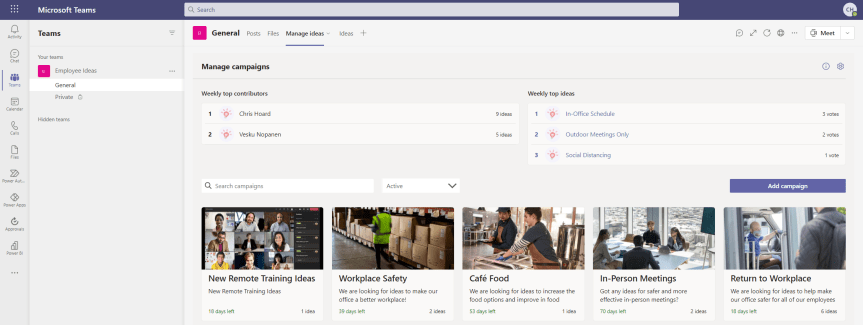
The last blog I did was on Bulletins. My good friend Vesku Nopanen responded in kind with Milestones. So I thought I would just go on to talk about Employee Ideas. Like Bulletins and Milestones, Employee Ideas is an app in the Teams Store which is built upon Dataverse for Teams. It's part of a new wave of Power Apps which can be deployed and then extended giving users a leg up as opposed to having to create something from scratch. So what's this one all about? Well, the description in the screenshot below outlines it pretty well: it's about creating and managing and voting up ideas in the team. Ideas for improvement. Ideas for change. Ideas for how to be more inclusive. For me this is a pretty cool for two reasons. The first is that I often have ideas but have nowhere to put them. Me being me I typically leave them in notepad or on an open excel, then I'd lose them or they would be buried in notes where I would never find them. I must get to a better place then ideas either being in OneDrive or in my head because if you are like me I am very forgetful. Maybe that's just my age. Secondly, I love the prospect that this could potentially be used similar to Uservoice, particularly when it comes to crowdsourcing innovations or improvement actions. Let's get great ideas teamwide, let's not have a monopoly or self identify as having the best. Now, as far as I know the Employee Ideas app came out sometime around November/December 2020 - but I could very well be wrong about this. Bulletins and Milestones are the newer apps, but these have all been close enough together they could be considered in the same wave. Most I talk to don't realise that they are even there, so are probably going to get discovered together. Let's get hands on with this one.
Teams: #FightCorona – Apps Part 2: Bots, Connectors and Custom Apps

Having looked at personal apps, tabs and messaging apps, the penultimate blog - and the final one on Apps - is on Bots, Connectors and Custom apps. In my personal experience, most people are used to using apps - whether this is on their mobile phones, or on their operating systems such as Windows or MacOS - they understand the concept of apps which gives them a head start in terms of installing them when beginning to use Teams. However - and again from my own personal experience - they typically have far less experience of Bots, Connectors and Custom Apps. Bots are automated programs that respond to queries or give updates and notifications. Connectors connect content and updates from external services directly into a Teams channel or chat. They can both be amazingly useful if you spend a bit of time getting to know them and getting hands on with them. With custom apps - the world really is your oyster - if you have the skills to package an app via App Studio or make the app through the Power Platform, then you can start tailoring what each and every Team needs. This is when we start thinking about Teams as a platform for our communication and collaboration needs not simply an application in-itself
 @Microsoft365Pro