
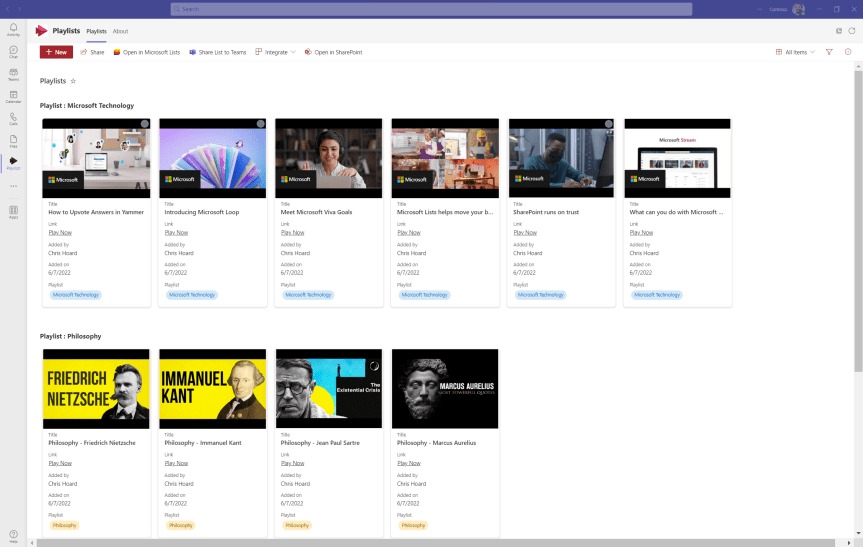
What is cool about Microsoft 365 is the synergy between applications. Standalone they are strong apps in and of themselves - but as a former architect there is a real enjoyment about making them work together to produce something which is greater than the sum of it's parts. Now, the last few evenings I have been focusing on Microsoft Stream - long overdue given I used to write about it quite a bit back in the day. I talked about redirecting to the new Stream Web App experience, I talked about the fundamentals of building a video portal and surfacing that in Teams. A little bit before that I wrote on the new chapter functionality and how this will make videos more easily searchable. Now, I am going to take a different tack and bring another app into the fold which is Microsoft Lists. Like Stream, Lists is another app in 365 which I love, and which I use often. Now what this can be used for is to make a Playlist. A Playlist by definition is 'a list of pieces of music chosen by someone to listen to on their computer, phone, etc.' So a playlist could easily apply to video. Let's see if we can make one up
Category: Microsoft SharePoint
Direct the App Tile Launcher to the new Stream on SharePoint web app experience in office.com – Via GUI or PowerShell
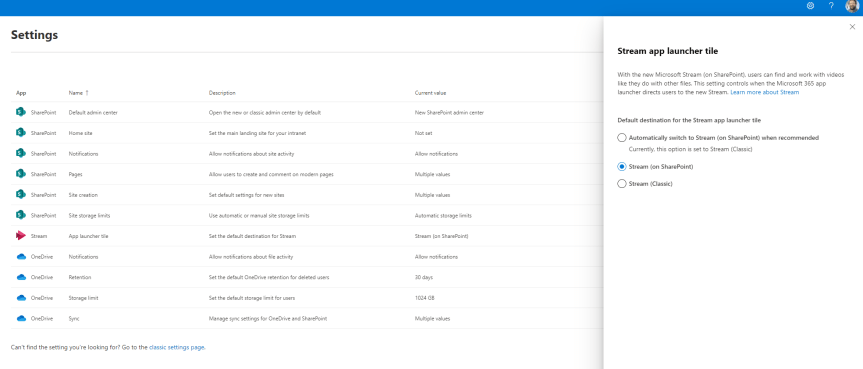
Hope your enjoying the Jubilee bank holiday this weekend! After taking my five year old to a two hour - yes you read that right - two hour pantomime today let's just say I'm 99% there on the old cognitive load. I'll be giving the BBC coverage of Party at the Palace a miss. I'll be giving TV a miss. In fact, I'll be enjoying silence in the most myriad and profound kind of ways. So in order to unpack I'd thought I do a quick blog. A virtual commute as you will. Into nothingness. In 45 minutes I am going to discuss how an org can direct to the new Stream on SharePoint experience for their users in office.com - which I see has now dropped into Ring 4 in a test tenant. It was only a few weeks ago - maybe a month - where I discussed the new Video Chapters. A few months prior to that I discussed how it was possible to use the URL steam.office.com to get to the new web app experience. The point is with the introduction of the web app and the player I feel we are moving towards a tipping point in the transition from classic to Stream on SharePoint. I feel we are starting to get to the good stuff. So what is this blog in particular addressing? Well Stream in the App Tile Launcher - what you and I know as the Waffle - in office.com continues to direct to classic (https://web.microsoftstream.com) whereas you can now set it in the SharePoint Admin Centre to direct to Stream on SharePoint (https://stream.office.com). As much as users knowing the URL it's never going to be as memorable as just redirecting via the App launcher. So let's take a quick look, as there isn't much to do - rather you just need to know where to switch it. Later on, I am sure it'll become the default
Teams Real Simple with Pictures: Flows triggered with Keywords; Commands through the front end
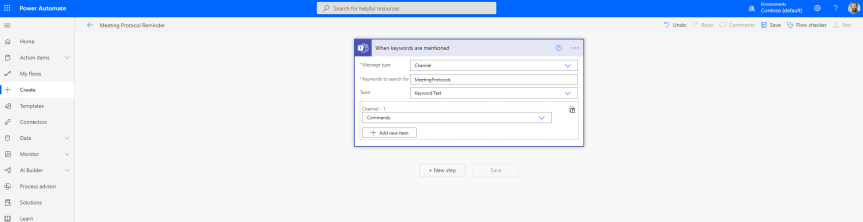
Hands up! There was a time when I was dead against automation. Early in my IT career I was a provisioner and back then all the setups and the migrations were done manually. Can you believe there was a time when we used to move mailboxes by Exmerge and via SFTP servers? That's right, 5 hops of live data. Or when we used to login manually into DNS servers to manually add DNS records to zones? A record by A record CNAME by CNAME. Yeah I remember it. But why was I dead against automating that? Because I am human. I thought that automation wasn't having faith in people. I thought it would ultimately lead to us all being done out of the job. So here I am. 14 years in. It never gets any less busier. It is, by all accounts, the myth of Sisyphus. But I get automation now. I got it when I went through a period a few years back where I was so busy that I practically couldn't cope anymore with the volume so needed to learn Power Automate to save minutes, minutes which turned into hours. Now? I use it extensively. I've blogged previously on some of the ways that I use it in my job. How I use it with Lists, and Forms, and Approvals. I use it with Dynamics. So I was excited to see, having been away a while, that Power Automate released a trigger for Teams which uses keywords
Teams Real Simple with Pictures: Disabling Add Shortcut to OneDrive

You know, I have this good mate online. His name is Phil Worrell, and the thing about Phil is he is quite possibly the greatest ever community member who has yet to win a ring. He's like the Charles Barkley of the Microsoft Community. He should be an MVP. I think so. They should give it to him on merit because it would be the right thing to do. Because he's great technically but also I know for sure he's supported many MVP's over the years. He's supported me well before I was one over social. Now I first met Phil back at SharePoint Saturday London in 2019 before the pandemic when things were still in person. That was the one where I sat in Karoliina Kettukari's session and asked questions - and she didn't know who I was even though I knew one day she'd speak at my conference. I had a full on conversation with Daniel Laskewitz and Rick Van Rousselt and Dan had absolutely no clue who I was (Rick did he wanted to go drinking :D). And Chirag, my good friend Chirag! I didn't know him then, nor Edyta nor Marijn, nor Liz Sundet or Hans Brender. If only I went there now, right? But Phil? Phil literally shouted 'Hey Chris' across the hall and we had a catch up - presumably on Teams but it could have been very much along the lines of 'what the hell you doing back in the UK Phil, you live in Switzerland'. Phil is a community guy through and through. He's one of the good ones. He'll champion your cause and then some. He's like John Wynne. So this one is for Phil. I promised it for him today on Twitter in a moment of weakness 😀
Teams Real Simple with Pictures: Block Folder Creation and File Sync in a team
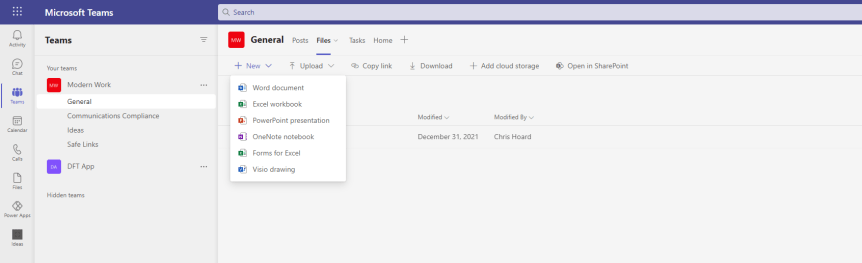
I'm back. It's been two months. And maybe one day I'll tell you all about it. But today isn't that day and I have about two hours to write this from start to finish given I like to be in and out on a Sunday night. So today I am going to return to files: and two requests I had last week which were reminiscent of my time on the Microsoft Tech Community. These are the ability to block the creation of folders in a Teams Files Tab and the ability to block the option to sync - and to be fair these both legit asks from one admin to another. First, the org admin asked to block folder creation as they only wanted to have one layer of files and didn't want the folder structure becoming too complex, with too many click throughs for their users. Secondly, they asked to block offline sync as they didn't want users to sync the files to their local machines. So, all in all, very reasonable. Of course, like many things I have written about previously on this blog this isn't a socratic exposition of why, or because we can doesn't mean we should. Here I am simply concerned with can we do it? and if so then then the ethics are for you to decide. So as I return to blogging, this isn't going to be the biggest blog you've ever seen, but I kinda need something to get going again after having a long break. Ok?
 @Microsoft365Pro