
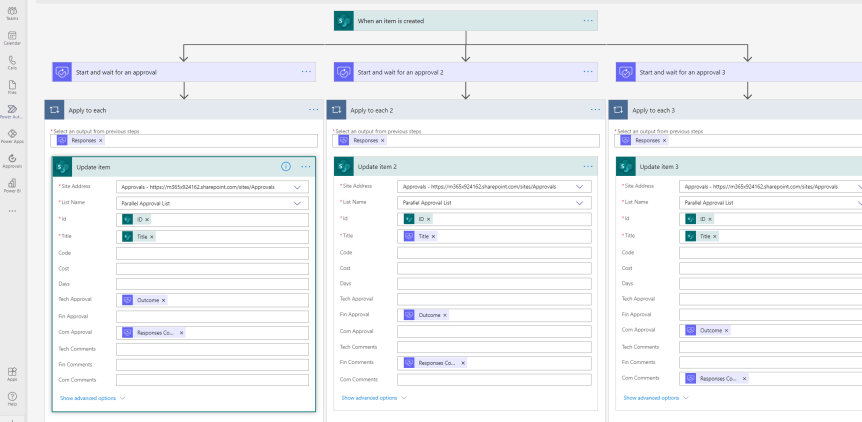
Having just got back from 3 days at the MCT Connect and MCT RL conference, I am looking forward to the conference season. Sounds weird to say it like that. But I guess what I am trying to articulate is that after having had good fun at Ignite, MVP Summit and MCT - all large multi day events, I am looking forward to getting back to speaking at singular day events and user groups where you can kind of rock up, do a nice session, and exit stage left, maybe catching one or two other sessions in the process. Transactional. Light. I am sure many circuit speakers understand where I am coming from. Now, for me, the 2021 conference season kicks off with a trip back to the Reactor where I'll be speaking with Vesa Nopanen on approvals. We've got a lot of demo lined up and we need to try it out for Marathon the week after. But when I was stitching the session together I thought of an idea that I wanted to explore a few months back when I was doing blogs on approvals but never got around to, which was parallel approvals. You see, if you are like me who operates across departments or support multiple business units within a group, parallel approvals are important because approval needs to come from multiple independent stakeholders. Imagine this scenario, I used to be Head of Professional Services where I worked, and when I was designing and developing new Professional Services items I used to need technical, financial and commercial sign off. They wouldn't make the decision together because they are all independent, and so before an item could be released all the stakeholders would need to evaluate it based on their respective reviews before it could go to market. I know, I know, I still have that blog on Viva Connections to do and that's probably more relevant and in vogue, but hey I have an approvals session on Tuesday and the completionist in me hates leaving things I meant to cover previously
Category: Microsoft Teams
Teams Real Simple with Pictures: Custom Policy Packages
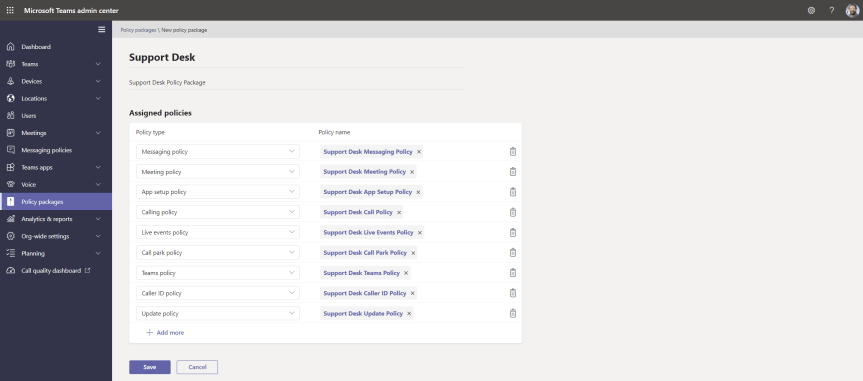
On the speaker circuit I occasionally talk about Policy Management in Microsoft Teams. It's something I enjoy talking about too. Why? Because when it comes to Teams I believe having a good grasp of policy is necessary for shaping a good user experience. It's important too from a security, compliance and governance perspective. Now like any talk this one's evolved to account for a number of incremental adds. We've seen the introduction of update policies where you can add users into private preview to test out functionality in advance. We've seen template policies. We've seen the ability to use the TAC to manage meeting backgrounds within the meeting policy. And during all of these talks one of the things which has featured has been policy packages. Policy packages are defined as 'a collection of predefined policies and policy settings that you can assign to users who have similar roles in your organization'. In other words, we assign a policy package to a teacher, or a student or a nurse or to a firstline worker - and that policy package contains a messaging policy, and a meeting policy, and a live events policy and so on and so forth. The benefit of the policy package - a container as it were similar to an access package in Azure AD - is that it makes it easy for administrators to standardise what users can do and how users can experience Teams based upon role. It can make it easier to assign multiple policies without getting too granular. An awesome functionality is that you can also use group policy with dynamic groups and assign the correct packages as users transition roles. Yet for all the virtues of packages, the big limitation has always been we couldn't create custom policy packages. We've had a number of preconfigured ones by Microsoft - and that's all well and good except we've needed to create packages for our own roles, our own organisations. Well now we can
Teams Nation reaches 1000 registrants, and will be returning April 6th 2022
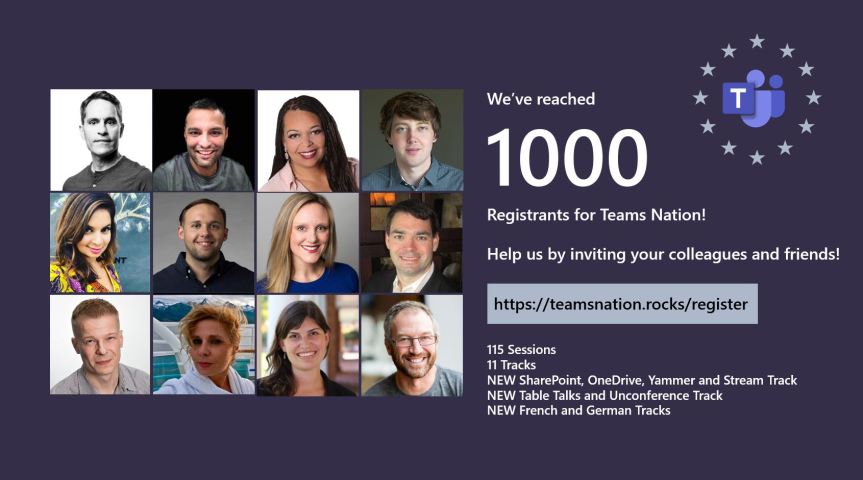
The excitement for Teams Nation is building. Today, we discovered that we had surpassed 1000 registrants, which is absolutely amazing considering that just a few weeks ago we thought that we may not have been able to run Teams Nation at all. Now that the dates for Microsoft Build have been officially confirmed (25th - 27th May) we can disclose that we discovered these dates via a leak online and had to make an immediate call on whether to stick with the date of 26th May, whether to reschedule or whether to cancel it outright. Since we had committed to doing another event last October - the first since we changed the name from TeamsFest to Teams Nation we really didn't want to can it since we had been working on it since the new year. We also decided that it would be unfair to make attendees choose between Teams Nation and Build as we thought many who would register for our event would ultimately like to attend both. So we ended up bringing Teams Nation forward by two weeks to Wednesday 12th May. Our choice on this date is mainly due to when all of us were available, as well as avoiding conflicts or being too close to any other events that we were aware of in the calendar
Teams Real Simple with Pictures: Using the TAC to manage users backgrounds in Teams Meetings
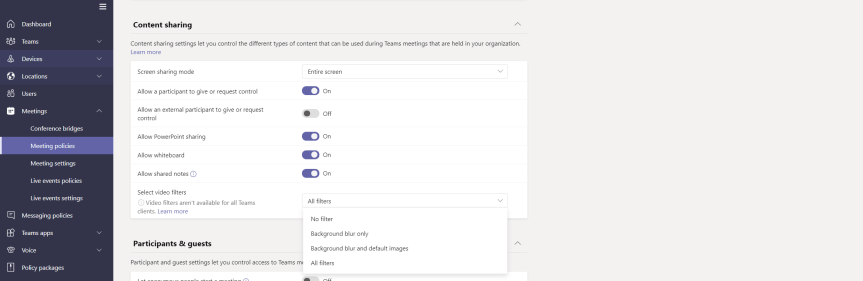
A real short one this week - for two reasons. The first is that I am on annual leave - and whilst annual leave may conjure up the romantic idea of taking a break, this is when I usually crack on with the long list of things which I need take care of at home. This Easter weekend has included completing a 6 x 8 concreate base for a shed, and putting up a large trampoline in the back yard for my son. Secondly, I was all up for writing an in depth blog for Viva Connections - and I started doing that until I realised that the SharePoint app bar hasn't surfaced in my demo tenant yet. I decided I didn't want to push something out that I wouldn't be ultimately happy with. So in the meantime I was searching for something to write about when I saw that the ability to control meeting backgrounds has now come to the TAC. For some time this has only been available in PowerShell - and whilst this blog will literally be up there with the shortest I have ever written, the functionality is really important to consider for all organisations. Why? You see when custom backgrounds were first released there were a lot of people on social racing to advocate how these could be back doored on windows machines. And whilst I agree they were great for identity and personalisation, and great for marketing and buy-in in regards to adoption, I also agree they can be problematic for IT admins. How can they be policed? How could you stop someone in your organisation uploading something offensive as a background? Whilst I hope you haven't seen anything offensive I personally have. I've seen someone outside my organisation using a hospital ward as a background because they thought it was funny to do so during lockdown. I've seen another - again outside my organisation - using politicised images which aren't appropriate nor professional for any type of meeting. Where have they got those images from? Are they commons or are they copyrighted? So we need to make a call, especially as Microsoft Teams does not screen backgrounds which are uploaded by users. Surfacing these in the TAC is good in that it brings attention to these controls, but also helps admins which, let's face it, don't like PowerShell or don't read Docs all too often. Every IT admin now has the ability to easily control backgrounds based on the tools they like to use
Teams Real Simple with Pictures: Setting Table Permissions for Dataverse for Teams Apps such as Bulletins or Employee Ideas

Last month I wrote a bit about the new Power Apps Templates in Teams - Bulletins and Employee Ideas, and last week I discussed Applying DLP policies to the environments these apps are housed in. Now It feels pretty natural to continue this conversation about data and discuss Table Permissions within the apps themselves. This is because it's these permissions which determine how users inside and outside the team - and guests - can work with the apps and the data that they contain. Firstly, it's important from a usability perspective that we can granulate access. Think of the following scenario - one team member needs full access over one app in the environment because they are managing it whereas that same user may only need read access over another because they don't need to touch any data within it or add any data to it. You may also want team members to be able to modify data with a specific part of the app - for example links in Bulletins, and not in others. This is all possible with table permissions. Secondly, it's also important from a security and compliance perspective. We want the users we need using the app in the way we specifically need them to use it. Circling back to the DLP conversation last week whilst we want to trust that others will handle the apps and the data within them in the right way, having carte blanche in terms of permissions, or even having permissions for certain users, or guests, at all opens things up to all sorts of risks including insider threats. Like DLP, this is certainly something we want to think about when we deploy, or when we are sharing it outside the Team
 @Microsoft365Pro